
AI Workflow Scorecard for B2B Consultants
A practical scorecard to prioritize AI tasks, run 30-day pilots, protect client data, and measure net time savings for consultants.
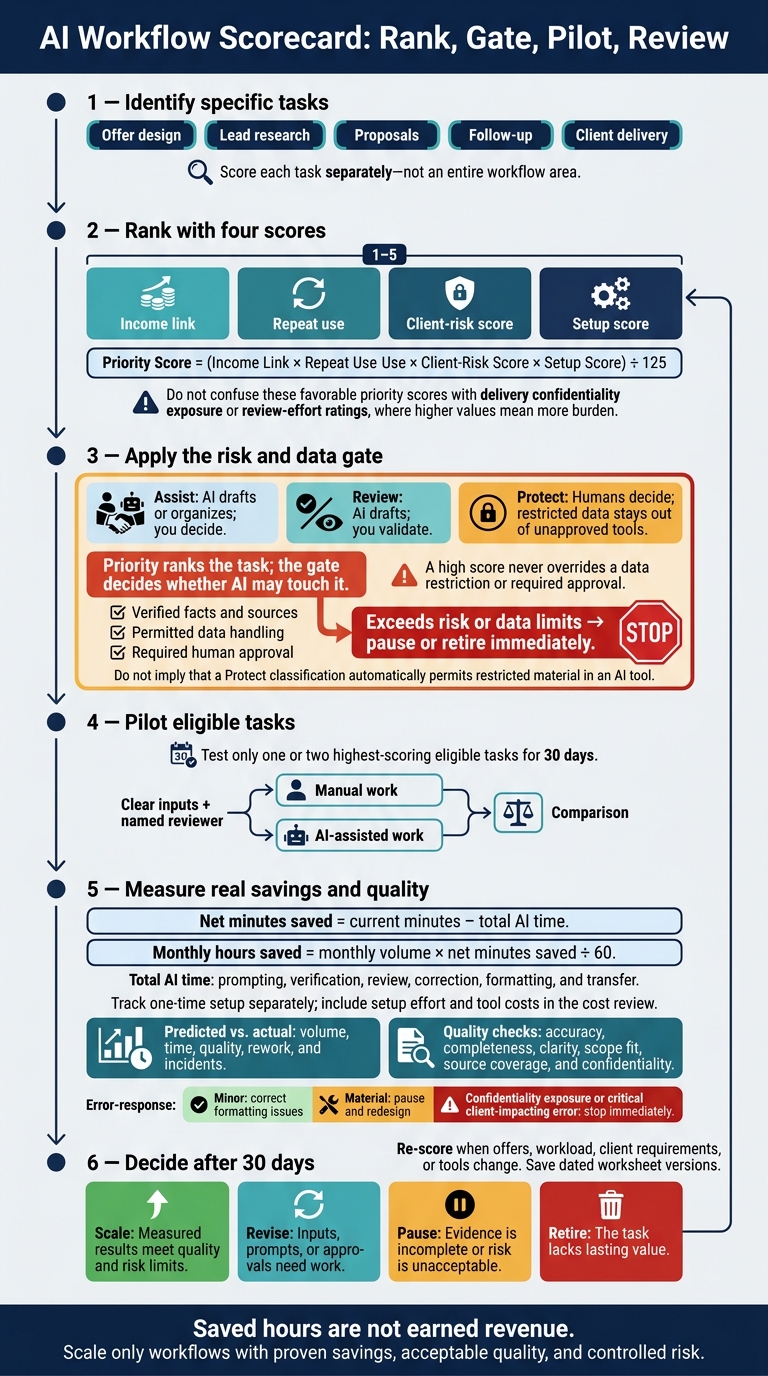
I rank tasks before choosing AI tools - and test only one or two eligible tasks for 30 days. I score each task from 1–5 on its income link, repeat use, client risk, and setup effort. Higher scores favor work tied to revenue that repeats often, carries less risk, and takes less time to set up.
I apply that check across five areas:
- Offer design: Check buyer needs, scope, delivery costs, and margin.
- Lead research: Verify sources and separate facts from assumptions.
- Proposals: Draft from approved inputs; keep pricing and commitments under human control.
- Follow-up: Confirm recipients, owners, due dates, and next steps.
- Client delivery: Protect data, check outputs, and record approval.
My rule: a high score never overrides a data restriction or required approval. I count prompting, review, corrections, and rework before calling any time “saved.” Then I compare results with the manual process and decide whether to scale, revise, pause, or retire the workflow.
Saved hours aren’t earned revenue. The test is whether AI saves time without lowering quality or putting client trust at risk.
How AI Changes Prioritization - Troy Magennis
2. Rank Offer Design and Lead Research Tasks
Use the same scorecard to rank the next two revenue inputs: offer design and lead research.
Offer Design: Check Outcomes, Scope, and Margin
Score each task separately with the Section 1 worksheet and its existing setup scale. Don’t give offer design one combined score. Higher-risk tasks need documented human approval before AI use.
Score income link by whether the output supports a sellable offer. Score repeat use by how often the process repeats.
| Task | AI contribution | Consultant decision | Client risk | Approval requirement |
|---|---|---|---|---|
| Discovery-note clustering | Group themes and keep source references | Confirm themes and relevance to buying decisions | Misreading client priorities | Approve before using in an offer |
| Recurring-problem summaries | Draft a summary of the problem, impact, and evidence | Confirm urgency and commercial value | Invented demand or overstated impact | Approve against discovery evidence |
| Offer outlines | Draft outcomes, deliverables, and options | Set price, scope, and commitments | Scope creep and margin loss | Approve commercial terms |
| Service boundaries | Flag exclusions, dependencies, and client-owned work | Decide boundaries and change-control rules | Unpaid work or unclear responsibilities | Approve before client use |
| Delivery-effort estimates | Organize historical hours and assumptions | Confirm capacity, staffing, and contingency | Underpricing or missed deadlines | Approve hours and cost assumptions |
| Buyer-specific positioning | Tailor approved evidence to the buyer’s context | Confirm differentiation and claims | Misleading messaging | Approve each external version |
Before marking an offer ready for proposal writing, approve these inputs:
- ☐ Define the business problem using dated discovery notes.
- ☐ Approve a measurable outcome with a baseline, target, and timeframe.
- ☐ Confirm repeatable delivery with clear deliverables and exclusions.
- ☐ Protect capacity for meetings, revisions, and rework.
- ☐ Check acceptable margin against price and expected delivery costs.
Track sales and admin time separately. Hearing about a problem often doesn’t prove buyers will pay to solve it.
After ranking offer inputs, score research tasks by how reliably they support qualified outreach.
Lead Research: Check Sources and Account Fit
Score research by its impact on qualified conversations - not the number of profiles collected. Reusable templates can score high on repeat use, but their facts still need verification.
Keep confirmed facts separate from account hypotheses. AI must not turn a public signal into a claim about budget, buyer intent, or procurement status.
| Research task | Repeatability | Data sensitivity | Decision risk | Human verification |
|---|---|---|---|---|
| Account research | High | Low to medium | Medium | Confirm company identity, geography, and current initiatives |
| Industry summaries | High | Low | Medium | Check source dates and relevance to the target segment |
| Buyer-role mapping | Medium to high | Medium | High | Confirm current employment, role, and decision authority |
| Public signals | Medium | Low to medium | Medium to high | Check the original announcement and its date |
| Account hypotheses | High | Medium | High if presented as fact | Label assumptions and test them in discovery |
Before using research in outreach or proposals:
- ☐ Record source links.
- ☐ Record source publication or access dates.
- ☐ Confirm account fit with the target segment.
- ☐ Verify important facts against authoritative sources.
- ☐ Confirm personal information is publicly available, relevant, and permitted for the intended use.
Public availability alone doesn’t establish permission. Mark records missing these checks as research only, not outreach-ready. Use verified facts - not assumptions - in outreach and proposals.
For Microsoft co-sell work, apply the same source-verification standard before sharing any claim externally. Verify solution-area fit, applicable sales plays, current Partner Center requirements, Marketplace publication status, eligibility, and regional sales contacts.[4][5]
Confirm Microsoft seller ownership separately. Barron Tech’s Co-Sell Buddy can support account mapping, seller ownership, and coverage tracking, but it doesn’t replace source checks.
3. Rank Proposal and Follow-Up Tasks
Use the verified discovery notes and account facts from Section 2 to draft proposals and plan follow-up tasks.
Proposals: Approve Scope and Commitments
Automate drafting, not commitment. Work from approved discovery inputs, not new AI-generated assumptions. Score each proposal component separately using Section 1’s fields, and adjust the starting scores below to fit your workflow. Begin with reusable drafting tasks. Statements of work need manual approval, no matter their priority score.
Measure drafting time saved as baseline drafting time − AI draft time.
| Proposal component | Income link | Repeat use | Client-risk score | Setup score | Review burden |
|---|---|---|---|---|---|
| Proposal outline | 4 | 4 | 4 | 5 | Check structure and requirements |
| Executive summary | 4 | 3 | 3 | 4 | Check business need and claims |
| Deliverable descriptions | 5 | 4 | 3 | 4 | Check outputs and acceptance criteria |
| Assumptions and dependencies | 5 | 4 | 2 | 3 | Confirm client inputs and responsibilities |
| Statement of work | 5 | 3 | 2 | 3 | Review every obligation |
| Client-specific wording | 4 | 3 | 3 | 4 | Verify facts and tone |
Track prompting, review, corrections, and approval time separately. Net time saved = baseline time − AI time − review time. Count prompting as AI time, and corrections and approval as review time.
Ask AI to mark missing inputs as [NEEDS CONFIRMATION] rather than fill gaps. Label each component AI draft, human edited, or human approved. Personally approve pricing, payment terms, legal language, security and compliance claims, delivery dates, staffing assumptions, service levels, warranties, delivery commitments, and success metrics.
Before sending:
- ☐ Confirm that client requirements, deliverables, acceptance criteria, milestones, exclusions, dependencies, assumptions, and success metrics are explicit and match approved records.
- ☐ Check client names and facts against approved records.
- ☐ Check dates against capacity, holidays, subcontractor availability, and other active engagements.
- ☐ State client responsibilities clearly.
- ☐ Obtain manual approval for pricing, taxes, expenses, payment milestones, and contractual commitments.
- ☐ Check the recipient, attachment, version, and expiration date. Record the reviewer, approval date, and unresolved risks.
Move approved scope, owners, and next steps into follow-up only after manual review.
Follow-Up: Assign Owners and Next Steps
Rank follow-up tasks against approved commitments. Adjust these starting scores to fit your workflow. 5 means strongest income link, highest repeat use, lowest client risk, or easiest setup.
| Activity | Income link | Repeat use | Client-risk score | Setup score |
|---|---|---|---|---|
| Meeting summary | 4 | 5 | 2 | 4 |
| Action-item extraction | 4 | 5 | 3 | 4 |
| Personalized recap email | 5 | 4 | 3 | 3 |
| Reminder creation | 4 | 4 | 2 | 4 |
| Opportunity-stage update | 4 | 3 | 4 | 3 |
| Microsoft seller activation request | 5 | 2 | 4 | 3 |
Every follow-up needs:
- ☐ A named owner and due date - or an explicit “no date agreed.”
- ☐ The customer objective and next decision point.
- ☐ A recipient-specific message that fits the relationship, with promises checked against meeting notes and approved commitments.
- ☐ Correct recipients, permission to share sensitive information, and required attachments.
- ☐ Human approval of timing, messages, and record changes before execution, followed by an opportunity record update.
For Microsoft co-sell, record the account owner, Microsoft seller, opportunity stage, activation request, customer objective, and next action date. Verify customer consent where required, account identity, routing, and seller acceptance against current Partner Center guidance.[6][7] Specify what you’re requesting: a customer introduction, marketplace-path confirmation, or technical-validation review.[8] Barron Tech’s Co-Sell Buddy can support campaign follow-up and assigned execution ownership; it does not replace Partner Center records or human approval.
4. Rank Delivery Tasks and Protect Client Data
Start with priority scoring, then apply a data gate to set limits on AI use.
Choose the AI Handling and Required Review
Keep the four scores from Section 1 and add a delivery risk gate:
- Assist: AI drafts or organizes; you decide.
- Review: AI drafts; you validate.
- Protect: Humans decide; restricted data stays out of unapproved tools.
Priority ranks the task; the gate decides whether AI may touch it. Assign each task to Assist, Review, or Protect before it enters the 30-day pilot.
Use the classifications below as a starting point. Adjust them based on the actual data and client consequences. Score confidentiality exposure and review effort from 1 (low) to 5 (high). Higher scores mean more burden. For confidentiality exposure, 3 means internal client information; 5 means regulated, personal, commercially sensitive, or contract-restricted data.
| Delivery task | AI handling | Client consequence | Confidentiality exposure | Review effort |
|---|---|---|---|---|
| Session preparation from approved materials | Assist | Medium | Low–Medium | Low |
| Research synthesis | Review | High | Medium | Medium–High |
| Workshop agenda and exercise drafting | Assist | Medium | Low | Medium |
| Weekly status reporting | Review | High | Medium–High | High |
| Quality-check drafting | Review | High | Medium | Medium–High |
| Knowledge-base organization | Assist | Medium | Medium | Medium |
| Progress summarization | Review | High | Medium–High | High |
| Strategic recommendations and final deliverable approval | Protect | High | High | High |
Before processing client material or releasing work:
- ☐ Confirm data handling: Check client terms, the approved tool, workspace, data types, retention, training settings, and access limits. Remove unnecessary personal data. Keep client workspaces separate, and keep credentials and prohibited material out of the workspace.
- ☐ Verify facts: Check calculations, milestone status, blockers, and conclusions against engagement records - not the AI draft.
- ☐ Track sources: Save document links and versions. Remove unsupported claims, and check that knowledge-base organization preserves access restrictions.
- ☐ Record approval: Save the reviewer, date, corrections, and final approval separately from the draft.[9][10]
Track Net Time Savings and Quality
Measure net hours saved per engagement, not raw drafting speed. Gross savings are the manual time avoided before review, corrections, and rework. Track setup time separately from delivery savings.
For 30 days, score comparable manual deliverables on accuracy, completeness, clarity, scope fit, source coverage, and confidentiality. Apply the same checks to AI-assisted work. Log correction counts, rework minutes, client feedback, and client-visible quality changes. Keep approved templates and prompts, but do not retain client content unless authorized.
Classify errors as minor, material, or critical. Correct minor formatting issues. Pause and redesign any workflow that produces unsupported recommendations or other material errors. Stop immediately if confidentiality is exposed or a critical error affects the client.[11] Continue only when savings are positive, quality stays steady or improves, and review effort remains within what the team can handle.
Carry the approved delivery rules into the final worksheet and pilot review.
5. Complete the Scorecard and Review Results
Bring the approved inputs from Sections 1–4 into one worksheet.
Rank Tasks in a Single Worksheet
Use the same 1–5 scale from earlier sections, with one row per task. Treat this worksheet as a template - not a benchmark.
| Workflow area | Specific task | Monthly volume | Current minutes/instance | Net minutes saved/instance | Income link | Repeat use | Client-risk score | Setup score | Setup hours | AI role | Required human approval | Est. monthly hours saved | Priority score | Pilot status | Decision |
|---|---|---|---|---|---|---|---|---|---|---|---|---|---|---|---|
| Offer design | Draft outcomes and scope options | - | - | - | - | - | - | - | - | Brainstormer | Consultant: outcomes, exclusions, pricing | - | - | Not started | - |
| Lead research | Prepare public-source account brief | - | - | - | - | - | - | - | - | Summarizer | Consultant: facts, dates, account fit | - | - | Not started | - |
| Proposals | Draft scope and assumptions | - | - | - | - | - | - | - | - | Drafter | Consultant: scope, fees, commitments | - | - | Not started | - |
| Follow-up | Draft next-step message | - | - | - | - | - | - | - | - | Drafter | Consultant: recipient, owner, due date | - | - | Not started | - |
| Delivery | Organize approved materials | - | - | - | - | - | - | - | - | Organizer | Consultant: completeness, access limits | - | - | Not started | - |
Net minutes saved = current minutes − total AI time. Count prompting, verification, review, correction, formatting, and transfer as AI time.
Monthly hours saved = monthly volume × net minutes saved ÷ 60. Track one-time setup separately.
Priority Score = (Income Link × Repeat Use × Client-Risk Score × Setup Score) ÷ 125.
A high score doesn’t override risk limits. Keep required human approvals and source checks. Mark tasks that exceed those limits pause or retire immediately, and keep the Section 4 data controls in place.
Review Pilot Results After 30 Days
Once the worksheet is complete, test only the highest-scoring eligible tasks. Start with one or two, each with clear inputs and a named reviewer.
After 30 days, compare predicted vs. actual volume, time, quality, rework, and incidents. Record volume, net minutes saved, quality, risk, and your decision in the same worksheet.
Include setup effort and tool costs in the cost review. Note whether freed time supported paid work or just reduced administration. Saved hours are not earned revenue.
Choose a decision based on the results:
- Scale: Measured results meet quality and risk limits.
- Revise: Inputs, prompts, or approvals need work.
- Pause: Evidence is incomplete or risk is unacceptable.
- Retire: The task lacks lasting value.
Re-score tasks when offers, workload, client requirements, or tools change. Save dated worksheet versions.
- ☐ Prioritize income-linked repeat work.
- ☐ Verify facts and sources.
- ☐ Protect client data.
- ☐ Retain human approvals.
- ☐ Compare predicted versus actual outcomes.
- ☐ Scale only workflows with proven savings, acceptable quality, and controlled risk.
FAQs
How do I break a tie between task scores?
When two tasks have the same score, prioritize the one that addresses the biggest risk to your business. Check which scorecard metric - income durability, manual-effort exposure, leverage, or optionality - falls in the Watch or Danger zone. If several metrics are weak, tackle the weakest first.
Don’t aim for perfection. Choose the task that does the most to improve your income model, so your efforts build on each other over time toward steady, predictable demand.
How many pilot runs make the results reliable?
Use the rule of three: successfully complete a task or workflow at least three times before documenting it. This helps confirm that you can follow the same process and get consistent results [1].
If you work alone, test your draft on the next suitable task. Mark any steps that depend on memory or improvisation. Then revise the draft until you can verify the outputs and the instructions are clear [2].
How do I value saved time that isn’t billable?
Saved non-billable time is worth more than the billable hours it frees up. Judge it by how it helps your consulting practice stay viable over the long term, withstand financial setbacks, get more from existing resources, and keep future options open [1].
During your 12-week review, look for activities that support repeatable income, such as refining templates, automating follow-ups, or standardizing workflows [1][2]. Cut tasks that don’t repeat or scale. Standardized processes reduce manual work, so revenue can grow without increasing your total hours worked [1][3].