
Best Account Context Sources for Co-Sell Teams
Stack seller notes, usage, partner contacts, funding, and campaign signals in one shared workspace to prioritize and close co-sell deals faster.
If Microsoft and partner teams don’t work from the same account picture, deals slow down. My takeaway is simple: no single source is enough. The best approach is to stack six inputs together and use each one for a different job.
Here’s the short version:
- Seller calls and deal notes explain what the buyer said
- Product usage, intent, and cloud signals show what the buyer is doing
- Partner relationship data shows who can get access
- Funding and firmographic data helps spot budget and timing
- Campaign history shows what the account has already looked at
- A shared workspace keeps all of it in one place for both sides
The article’s main point is clear: use behavior signals to prioritize and human context to tailor outreach. That matters because co-sell deals can close 46% faster and convert at a 53% higher rate, yet many partnerships still fail to turn into revenue.
Mastering Microsoft’s Co-Sell Program: A Partner’s Blueprint
Quick Comparison
| Source | Best for | Main weakness |
|---|---|---|
| Seller calls and notes | Buyer story, deal stage, next steps | Quality depends on the rep |
| Usage, intent, and cloud data | Prioritizing accounts and spotting movement | Can miss business-side buyers |
| Partner contacts | Warm paths to stakeholders | Access does not always mean active demand |
| Funding and firmographics | Budget fit and timing clues | Shows fit more than live deal motion |
| Campaign history | Message fit and account interest | Activity can be noisy |
| Shared workspace | Joint planning and one account view | Only works if teams keep it updated |
If I had to reduce the whole article to one line, it would be this: start with signals, confirm with notes, add partner access, then keep it all in one shared system.
1. Seller calls and shared deal notes
Seller calls and shared deal notes are as close as you can get to the actual buying conversation. They capture the customer’s own words: pain points, project names, budget details, and decision timing. That gives teams a solid starting point for qualification. In co-sell work, this is often the clearest view into what’s happening inside an account right now. In plain terms, seller notes are the best human starting point before teams add system-generated signals.
Buying-signal strength
Call notes show direct buying intent, not guessed behavior. If a customer mentions an initiative or asks what it would take to sign by a certain date, log that in a dedicated CRM Buying Signals field. That gives partners a way to sort and review accounts based on documented intent instead of instinct. A Gong Labs study of more than 1 million opportunities across 1,418 organizations found 35% higher win rates when teams used AI guidance on conversation data.[2][4]
Timing value
Call notes have the most value right after the meeting. Update them within 24 hours, and treat notes older than 30–45 days as stale.[5][7] A simple habit helps here: block 5–10 minutes after each call to update the stage, close date, and next action.
Stakeholder depth
Good notes do more than list names and titles. They should tag economic buyers, technical evaluators, procurement, security, and blockers in the CRM. That gives partners a clear coverage map before the next customer call.[6][3]
Best co-sell use
Structured notes help partners understand the business problem, decision criteria, stakeholder map, and next steps without running a second discovery call. Barron Tech’s Co-Sell Buddy helps by centralizing structured notes in a shared co-sell workspace, linking them to opportunity records, and making partner handoff simpler. Use these notes as the human baseline, then check them against usage and cloud signals.
The summary below shows where seller notes matter most.
| Deal Stage | Timing Value of Seller Notes | Risk of Incomplete Data |
|---|---|---|
| Pre-Meeting | Highest: Used for registration and alignment | High: Missing AE/SSP mapping can stall the deal |
| Active Pursuit | High: Weekly rhythm keeps the deal moving | Medium: Stale funding or program assumptions |
| Post-Meeting | Medium: Used for follow-up and intro support | Low: Focus shifts to delivery scope |
2. Product usage, intent, and cloud signals
Seller notes tell you what a customer said. Usage and cloud signals show what the customer is doing - and they often show it earlier. That makes them a fast reality check on what the seller heard in the call.
Buying-signal strength
Product usage signals come from first-party behavior data. The clearest signs usually show up in steady adoption over time, growth in feature use, API activity, and plan-limit triggers. When an account starts hitting those limits, it’s often a sign they’ve outgrown the current plan and may be ready for a more structured sales conversation.
Intent signals add another layer. Instead of looking inside the product, they show research behavior outside it: repeated visits to pricing and solution pages, content downloads, webinar attendance, and demo requests tied to core buying topics. A 2025 benchmark found a 23% pipeline velocity lift when intent signals triggered orchestrated multi-channel plays instead of a single-channel response.[8]
Cloud signals show changes in consumption and adoption inside the tenant. That can include new subscriptions, provisioned SKUs, migration from on-prem to cloud, or higher spend in a specific cloud category. Microsoft’s CloudAscent model follows this same logic: it combines fit scoring, updated quarterly, with buying signals, updated monthly, to group accounts by readiness.[10]
Timing value
These signals matter most in the first 30–60 days of repeated intent activity, during the pilot phase, and in the 60–180 days after deployment.[9] Timing matters a lot here. Signals lose value fast, so shorter scoring windows usually work better than stale rollups.
Stakeholder depth
Usage signals are good at surfacing technical owners and day-to-day operators, like admins, developers, and security teams. They usually do not show executives, finance, or procurement very well. That creates a problem for co-sell teams. If they rely only on telemetry, they can lean too hard toward technical users and miss the business sponsor needed to get the deal across the line.
That’s why usage data works better when paired with seller notes and partner relationship data. One shows activity. The other shows influence.
Best co-sell use
Use telemetry to rank accounts for joint outreach and shape the pitch around active workloads, instead of repeating what the customer already has. Barron Tech’s Co-Sell Buddy pulls usage and intent signals into the opportunity record and connects them to next steps. A simple way to think about it: usage signals set the readiness baseline. They either confirm what seller notes are saying - or they push back on it.
If usage shows an account is warming, partner contacts can help reveal who should open the next door.
| Signal Type | Timing Value | Stakeholder Depth | Best Co-Sell Use |
|---|---|---|---|
| Usage telemetry | High | Medium to high | Expansion, product-qualified-lead routing, renewal-risk detection |
| Intent data | Medium | Medium | Early-stage evaluation, outbound sequencing |
| Cloud usage and tenant signals | High for platform-led accounts | High | Platform expansion, attach motions, co-sell prioritization |
3. Partner ecosystem contacts and relationship data
Partner ecosystem data shows who the account already trusts. That’s why it’s often the best place to find the person who can move a deal forward.
Seller notes show your team’s view of the account. Partner data adds something different: outside influence. It shows which partner can reach which stakeholder, which executive keeps showing up to partner-led briefings, and which trusted vendor is already shaping a roadmap with technical leadership.
Buying-signal strength
Partner relationship data usually sits in the medium-to-high range for buying signals. It’s less direct than seller notes, but it can be far more useful when access is the problem.
The strongest patterns tend to look like this:
- A partner is already co-designing architecture with the customer’s technical leadership
- An executive attends partner-led briefings again and again over 6–12 months
- A customer asks a trusted partner to bring in someone who can help with FinOps on Azure
This isn’t about light interest. It’s about trust paths, access, and influence.
Research on partner-influenced deals shows they are 53% more likely to close, close 46% faster, and run 32% larger on average than non-partner deals.[14][15][16] Those numbers show what happens when teams use relationship context to shape the motion instead of just dumping it into a system and moving on.
Timing value
Partner relationship data matters most when it lines up with deal stages and delivery phases. Partner milestones, executive changes, and project phase shifts can all help you time outreach better.
Biweekly account-mapping sessions with top partners, focused on the top 20% of accounts, help teams spot these moments before they slip by.[11][12][13]
Stakeholder depth
This is where partner data often beats other sources.
One seller may know the procurement lead and a single business sponsor. A systems integrator (SI) may know the project managers and solution architects working inside a transformation program. A hyperscaler may know the CIO and CFO tied to cloud financial governance.
Put those views together, and you get a stakeholder map that no single CRM can match. Co-sell wins usually depend on reaching both technical validators and economic buyers. In many cases, partner contacts are the fastest route to the business sponsor who can actually move the deal.
Best co-sell use
Use partner ecosystem data to decide who should open the door, who should lead discovery, and who should own the proposal on shared accounts.
Barron Tech’s Co-Sell Buddy supports this with shared co-sell workspaces where partner contacts, stakeholder maps, and relationship notes are visible in one place. That makes it easier for Microsoft go-to-market teams and partner firms to run repeatable joint plays instead of piecing the story together again before every meeting.
Once relationship ownership is clear, funding and firmographic data show whether the account can fund the next move.
4. Funding, firmographic, and executive-priority data
Once you’ve mapped relationships, the next step is simple: find out whether the account has the money and the push to move. Funding, firmographic, and executive-priority data help you judge that early, before you sink partner time or seller effort into the wrong account. Use this layer to qualify accounts before you go deeper.
Buying-signal strength
A recent funding round is one of the clearest buying signals you can get. It often points to new budget, pressure to grow, and a push to invest fast. In fact, funded accounts can be 3–5x more likely to buy within the next year than unfunded peers.[23][26][29][30]
That said, not every round means the same thing. A round tied to hiring, cloud migration, AI adoption, security, or international growth is usually more useful than one tied to financial restructuring. One suggests forward motion. The other may just be cleanup.
Firmographic data works in a different way. Industry, revenue band, headcount, geography, and ownership type help you screen accounts, but they don’t tell you when to reach out.[27][31][32] Think of firmographics as a filter, not a clock.
The strongest fit signals usually blend scale with change. For example:
- A mid-market company in a regulated industry that’s hiring fast
- A distributed enterprise that likely needs standard workflows and executive support
Timing value
If a funding announcement hits, move fast. The best window for trigger-based outreach is usually within 3–14 days, when budgets and priorities are still taking shape.[17][18][21][24] Even funding events from the last 30–90 days can point to higher buying activity.[22][28][29]
Leadership changes make the timing even sharper. New leaders often reset tool priorities in their first quarter.[29][25] So when a leadership change shows up in the function you care about and it lines up with recent funding, that’s a strong cue to act now, not later.
Stakeholder depth
Press releases, executive comments, and job postings can tell you a lot about budget, growth plans, and hiring direction. But they won’t tell you much about relationship strength or internal blockers.[19][18][30]
Hiring patterns can still give you useful clues. Heavy engineering hiring often points to infrastructure and developer tooling needs. Heavy sales hiring can signal go-to-market and enablement spend.[19][20][22][28]
The table below sums up the tradeoffs.
| Insight Type | Inferable from This Data | Requires Seller or Deal Notes |
|---|---|---|
| Budget capacity | High | Low |
| Strategic focus | High | Moderate |
| Stakeholder roles | Moderate | High |
| Relationship strength | Low | High |
| Deal blockers | Low | High |
Best co-sell use
Use this data to decide which accounts deserve deeper research, partner involvement, or executive outreach before anyone spends time on discovery. It also helps to build funding-triggered playbooks with clear triggers, persona maps, and coordinated outreach. That gives co-sell teams a strong starting point for a joint pursuit.
Campaign history comes next: it shows whether the account has already engaged with your message.
5. Prior marketing and campaign engagement history
Funding shows buying capacity. Campaign history shows whether the account was already moving before a seller stepped into the deal.
This history reveals what the account looked at on its own. Email engagement, webinar attendance, content downloads, pricing-page visits, demo requests, and nurture activity can all point to interest and how many contacts are involved.
Buying-signal strength
Not all activity means the same thing. A single email open is light context. Pricing-page visits, ROI calculator use, demo requests, and repeat attendance at solution webinars are much stronger signals.[35][38][39]
The clearest pattern is when multiple contacts engage with related content in a short span. That kind of multi-touch activity is often the best sign that an account deserves joint attention from co-sell teams.[33][34][37]
Timing value
Timing matters just as much as volume. A simple way to sort it:
- Engagement in the past 30 days is hot
- Engagement from 31–90 days is warm
- Anything older is cold context
Three or more relevant interactions within 30–45 days often point to active evaluation, which means the team should act now.[36][37] If activity drops after a busy stretch, that matters too. The buying window may be narrowing, or the message may no longer fit.
Stakeholder depth
Campaign data can also show how far interest has spread across the buying group. If a CIO reads strategy content, a security lead joins a zero-trust webinar, and an infrastructure architect downloads a migration guide, that’s a strong sign that interest is forming across roles.[38][40][43]
Engagement with executive-level content matters even more. It can hint at sponsor involvement and a bigger deal path.
Best co-sell use
Use engagement history to plan the next move before the next meeting. Match past activity to likely initiatives. For example, heavy security and hybrid-cloud engagement can point to a secure modernization motion. Repeat cost-optimization engagement can point to an economic value discussion.
Share account-level engagement timelines so both sellers and partners can see what the account has already explored.[37][41][42][44] That makes it easier to check seller-reported interest before putting joint time and effort into the deal.
The next layer is the shared system that keeps these signals visible to both sides of the deal.
6. Shared co-sell workspace systems such as Barron Tech’s Co-Sell Buddy
A shared co-sell workspace pulls seller notes, cloud signals, partner contacts, funding data, and campaign history into one current record. Barron Tech’s Co-Sell Buddy builds on that record with account coverage, Microsoft contact mapping, seller ownership, follow-up tracking, and draft outreach. Put simply, this is the layer that turns scattered signals into one deal view.
Buying-signal strength
Workspace signals are composite and moderately strong. They show seller and partner behavior, not direct customer activity, so they take more judgment than product usage telemetry. At the same time, they’re far more structured than random call notes scribbled in a CRM.
The clearest signs tend to be deal speed and participation density. How fast are joint tasks moving? How many reps are active on the same account? If several Microsoft sellers and partner reps are working the same opportunity and joint steps are getting done fast, that usually means the account is active. Microsoft also says a co-sell opportunity should be a real opportunity with a clear ask, not a relationship placeholder.[48]
Timing value
This is where a shared system of record starts to pay off. Microsoft says referral receivers must accept or decline by the cut-off date or the opportunity is auto-declined.[46] Co-Sell Buddy’s seller ownership tracking and follow-up management help teams stay lined up with those dates without depending on memory or manual calendar reminders. That matters, because missed windows can shut a deal down before the next referral step even starts.
Stakeholder depth
A shared system of record can store the full relationship map: which Microsoft account executives, partner development managers, and partner reps are tied to which customer contacts, plus the response history around those connections. Co-Sell Buddy supports account and Microsoft contact mapping along with heatmap coverage tracking, so teams can spot where relationships are strong and where there are gaps before the next outreach.
That level of detail matters even more when a deal stretches across several buying roles. If you know which ties reach the economic buyer, the technical decision-maker, or the influencer, it becomes much easier to decide who should lead each conversation. Without a shared record, that kind of coordination can get messy fast.
Best co-sell use
Use a shared system of record when a deal needs joint planning across multiple sellers and partners, repeated touchpoints, or tight acceptance windows.[45][48] Keep the Partner Center deal ID, CRM ID, campaign ID, and acceptance status in the workspace alongside internal notes so it stays linked to the official record.[45][46] Microsoft is also moving co-sell toward more structured workflows, including Marketplace Intent for API-based referral submissions.[47]
That shared view is what lets teams compare sources on freshness, accuracy, completeness, and shareability.
How Each Source Rates Across Four Criteria
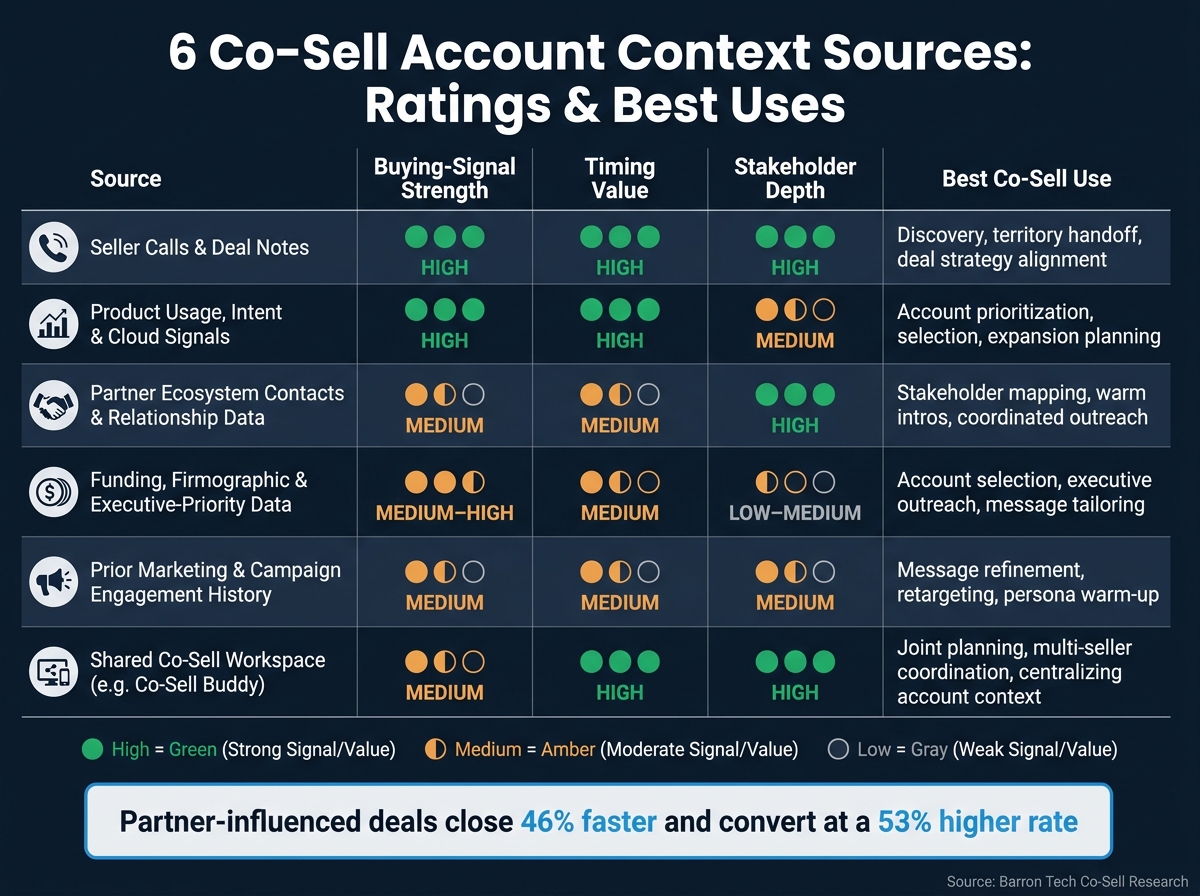 After the source-by-source breakdown, this table puts the tradeoffs in one place. Co-sell teams lean on these sources for different calls: qualification, timing, access, and coordination. The table below shows where each source stands on signal strength, timing, stakeholder depth, and execution.
| Source | Buying-signal strength | Timing value | Stakeholder depth | Best co-sell use | Main limitation |
|---|---|---|---|---|---|
| Seller calls and shared deal notes | High | High | High | Discovery, territory handoff, and deal strategy alignment | Note quality varies by rep |
| Product usage, intent, and cloud signals | High | High | Medium | Account prioritization, account selection, and expansion planning | Spikes can reflect testing |
| Partner ecosystem contacts and relationship data | Medium | Medium | High | Stakeholder mapping, warm introductions, and coordinated outreach | Access can outpace intent |
| Funding, firmographic, and executive-priority data | Medium–High | Medium | Low–Medium | Account selection, executive outreach, and message tailoring | Signal explains why now, not what next |
| Prior marketing and campaign engagement history | Medium | Medium | Medium | Message refinement, retargeting, and persona warm-up | Engagement can be noisy |
| Shared co-sell workspace | Medium | High | High | Joint planning, multi-seller coordination, and centralizing account context | Value depends on fresh data |
Three patterns stand out.
- Product and cloud signals lead on raw signal strength and timing, but they don’t say much about who is involved.
- Seller notes and partner contacts give the deepest stakeholder context, but that only helps when the information is current.
- Funding and campaign history do their best work as triggers and refiners, not as stand-alone proof that a buyer is ready.
The next section separates the practical upsides from the limits of each source.
Pros and Cons of Each Source
After the source-by-source ratings, this section gets into the day-to-day tradeoffs behind each option. No single source gives co-sell teams everything they need for account context capture. The table below helps match each source to the job at hand.
| Source | Pros | Cons | Best Fit Scenario |
|---|---|---|---|
| Seller calls and deal notes | Rich qualitative detail; captures buyer language, objections, and stakeholder map; highly relevant to current deals | Quality varies by rep; fragmented across tools; manual notes often capture only 4–6 data points per call and may hit CRM 30–120 minutes later [52] | Joint account planning; multi-partner meeting prep |
| Product usage and cloud signals | Objective and scalable; strong prioritization signal; reveals expansion opportunities before sellers surface them | Limited narrative context; can be misread without domain expertise; buyers remain anonymous for roughly 75% of their research journey, so first-party usage covers only part of the picture [53][54] | Campaign targeting by workload; quarterly pipeline prioritization |
| Partner ecosystem contacts | Opens doors to hard-to-access decision-makers; trust transfer from known relationships; shortcut to identifying who owns a workload or budget | Relationship data goes stale as stakeholders change roles; often stored informally; sharing can be politically sensitive | Enterprise co-sell; coordinated C-suite outreach |
| Funding and firmographic data | Reveals strategic priorities and budget likelihood; supports segmentation and executive message framing; firmographic-driven ABM can yield up to 73% larger deal sizes [50][51] | Broad and delayed; shows fit, not timing; high-level strategy doesn’t guarantee active project demand | Account selection; executive briefing prep |
| Prior marketing and campaign history | Identifies warmer contacts; guides content fit; useful for ABM-style co-sell plays and joint follow-up sequences | Noisy - opens don’t equal intent; contact-level data rarely reflects full account posture; data is often spread across multiple systems | Joint webinar follow-up; contact prioritization by engagement |
| Shared co-sell workspaces such as Barron Tech’s Co-Sell Buddy | Reconciles context from all other sources into one current record; standardizes how teams capture and share account data; improves workflow alignment across sellers and partners | Value drops without consistent adoption; requires configuration and process change; integration limits with some external data sources | Ongoing co-sell programs; joint opportunity management across Microsoft account teams and ISV partners |
A practical rule many experienced co-sell leaders use is behavioral signals to prioritize, qualitative signals to personalize. That’s the simple version, and it works.
Start with cloud usage or intent data to decide where the team should focus this quarter. Those signals help narrow the field. Then bring in seller notes and partner contacts to shape the outreach itself, because that’s where the human detail lives: what the buyer said, who matters, what’s stuck, and what may move the deal forward.
From there, add firmographic data and executive-priority signals to frame the message for C-suite conversations. That layer helps answer a different question. Not just who should we contact? but how should we talk about the business case?
A shared workspace like Co-Sell Buddy is where those layers come together. Instead of sellers, partners, and account teams each working from separate systems and partial notes, everyone can work from the same current picture.
The conclusion turns these tradeoffs into a simple selection order.
Conclusion
The ratings all point in the same direction: co-sell context works best when you layer sources instead of treating them like either-or options. The strongest co-sell teams pull from a small set of high-signal inputs, with each one doing a different job.
Seller notes tell the account story. Cloud signals show behavior. Partner contacts reveal trust paths. Funding and firmographics help with timing. Campaign history shows message fit.
If you lean on just one source, gaps show up fast. You get duplicate outreach, mixed messaging, and a fuzzy view of the account. A tool like Barron Tech’s Co-Sell Buddy keeps target accounts, Microsoft contacts, coverage, campaigns, and follow-up in one place. That setup turns scattered signals into one account view.[1][49]
Use seller conversations for narrative, cloud signals for behavior, partner contacts for access, funding and firmographics for timing, and campaign history for fit, then keep it all in one shared workspace.
FAQs
Which source should we trust first?
Start with direct conversations with Microsoft sellers. They’re closest to the accounts, so they often know what clients care about right now and where momentum is building. That makes their field input the strongest place to begin.
Then back that up with account research, like territory details and funding priorities. It helps you speak with more confidence, adds weight to your point of view, and gives you a better shot at earning a place in their pipeline.
How often should account context be updated?
Update account context on a steady cadence that matches your co-sell rhythm. Review it weekly so pipeline data, next steps, and outreach stay up to date.
Then do a deeper monthly review of Microsoft relationship coverage, especially for areas that need attention or have gone quiet. After key events, like a new seller engagement or shifts in funding or program assumptions, refresh the related context right away so it doesn’t get stale.
What should go in a shared co-sell workspace?
A shared co-sell workspace should bring all account context into one place so your team and Microsoft sellers can stay aligned and move fast.
Add account maps, seller ownership details, outreach drafts, and pipeline fields like ICP fit, next steps, and USD deal values. It should also include funding checklists, MACC/ECIF notes, and campaign assignments.
That gives everyone a single source of truth. And just as important, it helps stop context from slipping through the cracks across spreadsheets, docs, and scattered notes.