
Consulting Firm SOPs: Template and Examples
Copy-ready SOP template and five consulting examples—lead follow-up, discovery, proposals, invoicing, and reporting—with testing and review guidance.
I start every consulting SOP with a trigger, an owner, clear steps, and a record that proves the task is done. My rule: standardize routine work - not the judgment you bring to each client.
This guide includes a copy-ready template and 5 examples:
- Lead follow-up: Record inquiries, check fit, and assign the next action.
- Discovery calls: Confirm client needs and send a recap.
- Proposal review: Check scope, pricing, and approval before sending.
- Invoicing: Verify billing terms and track payment.
- Client reporting: Share progress, risks, and actions with owners and due dates.
I also cover record storage, exceptions, testing, review dates, and Microsoft co-sell follow-up. Start with one recurring task, test the draft, and update it when the work changes.
Copy-Ready Consulting SOP Template
Use this template as the starting point for every consulting SOP below.
Required and Optional SOP Fields
Copy these fields into your SOP. Keep required fields and remove optional fields that don’t apply. Use the same structure for lead follow-up, discovery calls, proposals, invoicing, and reporting.
Keep descriptions short. This should be a reusable working document, not a policy manual.
Title:
Document ID:
Version:
Status:
Effective Date:
Process Owner:
Department or Function:
Approved By:
Approval Date:
Next Review Date:

Purpose:
Describe the intended result in one or two sentences.

Scope and Exclusions:
State which activities, people, and clients this SOP covers.
State what it does not cover.

Roles:
Identify performers, reviewers, approvers, and escalation contacts.

Prerequisites:
List required information, access, templates, and approvals.

Definitions (conditional):
Define only terms with a specific internal meaning.

System-Specific Details (conditional):
Include software instructions only when the process depends on them.

Related Documents (optional):
Link supporting agreements, forms, or work instructions.

Procedure:
Complete the procedure table below.

Decision Rules:
Complete the exception table below.

Completion Criteria:
State the observable conditions that confirm the work is complete.

Records:
Complete the record-control fields below.

Review:
Review Frequency:
Review Trigger:
Review Owner:
Test Method:

Revision History:
Complete the revision-history table below.
In a solo firm, the same person may perform, review, and approve the work. Still label each role so someone else can take it over later.
The table below makes each step observable and easy to audit.
Procedure and Exception Tables
Give each row one action, one owner, one timing trigger, one output, and one quality check.
| Step | Owner | Action | Timing | Output | Quality Check |
|---|---|---|---|---|---|
| 1 | |||||
| 2 | |||||
| 3 |
Use the decision table for exceptions, including client-specific terms or approvals. For each exception, state the trigger, required approval or evidence, and escalation path.
| Condition | Required Action | Owner | Escalation |
|---|---|---|---|
Date, Currency, and Record Formats
Use MM/DD/YYYY for dates. Write dollar amounts with commas and two decimal places, and include an explicit time zone with every time.
Set retention periods based on contracts, laws, tax rules, and company policy. Restrict confidential records to authorized roles and keep the document version current. Use minor versions for clarifications and major versions for changes to controls or responsibilities.
Format Rules:
Dates: MM/DD/YYYY
Currency: U.S. dollars; commas and two decimal places.
Times: Include the applicable time zone.
Numbers: Commas for thousands; periods for decimals.

Record Controls:
Records Created:
Storage location:
Naming convention:
Authorized roles or permission group:
Retention period and governing requirement:
Deletion or disposal rule:
Track every approved change in the revision table.
| Version | Date | Change | Approver |
|---|---|---|---|
5 Consulting SOP Examples
The examples below follow the same field order and table structure as the template above.
Timing examples are hypothetical and subject to client agreements.
Lead Follow-Up SOP
Purpose: Give every inquiry a clear disposition and next step.
Trigger: A new inquiry or outreach reply arrives through a website, referral, event, email, or partner channel.
Owner: Sales lead.
Prerequisites: Inquiry details, service criteria, and calendar access.
Procedure: Record contact details, source, service need, budget, timing, and preferences. Check fit before scheduling the call.
Timing: Acknowledge within 1 business day; follow up after 2 business days and again after 5 business days.
Records: Save each attempt’s date, channel, message summary, outcome, and next action in the lead record.
Completion: Require a disposition, a next action, and an owner; if there is no next action, record none with a reason.
Disposition Decision rule Required action and evidence Qualified Need matches services, workable geography and timeline, and preliminary budget fits Schedule discovery call and send confirmation; save qualification notes, meeting date, and owner Not qualified Need is outside scope, geography, risk tolerance, or capability Send a courteous decline or referral; record the reason and disposition Not ready Potential fit exists, but timing, budget, or internal approval is unresolved Obtain permission for a future check-in; assign a follow-up date and owner No response No reply after the documented attempt sequence Close, pause, or place in an approved nurture process; save attempts, final disposition, and next review date
Discovery Call SOP
Purpose: Confirm the need and a workable next step.
Trigger: Discovery meeting scheduled.
Owner: Consultant.
Prerequisites: Prior communications, attendee list, agenda, and meeting link.
Procedure: Review prior communications. Confirm attendees, time zone, agenda, and confidentiality expectations. Document the problem, desired outcome, current state, constraints, stakeholders, decision process, timeline, and budget range. Check service fit and capacity; define success measures. Save notes and send a recap with findings, open questions, next step, owner, and due date.
Timing: Save notes within 4 business hours and send the recap within 1 business day.
Exceptions: For a no-show, request rescheduling and log the outcome; escalate unresolved fit or capacity concerns before promising work.
Records and completion: Save the call record and recap, with a scheduled next step or a documented decision not to proceed.Client and opportunity: Call date and time: Attendees: Problem: Desired outcome: Current state: Constraints: Stakeholders and decision process: Timeline: Budget or commercial parameters: Success measures: Service fit and capacity: Open questions: Next action: Owner: Due date: Decision: proceed / request more information / do not proceed Saved note location:
Proposal Review SOP
Purpose: Prevent scope and commercial errors.
Trigger: Draft proposal ready.
Owner: Proposal owner; reviewer approves delivery.
Prerequisites: Discovery notes, pricing inputs, and capacity confirmation.
Procedure: Trace each workstream to discovery notes. Check outcomes, deliverables, assumptions, exclusions, and client responsibilities. Confirm timeline, staffing, dependencies, risks, and supportable commitments. Verify pricing, taxes, expenses, payment terms, and validity dates. Check handling of confidential or sensitive information. Remove promises of results the firm cannot control. Get reviewer approval, or document a solo self-review, before sending.
Exceptions: Return missing assumptions for correction; route unusual commitments to the authorized approver.
Records: Track versions, approval, delivery, requested revisions, acceptance, expiration, and final outcome.
Completion: Save the approved version and delivery evidence; assign an owner and date for acceptance follow-up.
Category Included work Excluded work Client responsibility Change-request trigger Discovery and analysis Activities explicitly listed in scope Unlisted research or additional workshops Provide access and timely answers New requirement, delay, dependency, or material scope change Deliverables Named documents, meetings, or implementation outputs Ongoing support not stated in the proposal Review and approve drafts Additional revision cycle Timeline Milestones and estimated dates Delays caused by missing inputs Meet agreed decision dates Material schedule change Expenses and taxes Items expressly identified in pricing Unapproved travel or third-party charges Approve reimbursable costs New expense category or jurisdictional tax requirement
Invoicing SOP
Purpose: Bill accurately and track collection.
Trigger: A contractual billing event occurs.
Owner: Billing owner.
Prerequisites: Signed agreement or statement of work, purchase order if required, and billing evidence.
Procedure: Check the contract or statement of work for billing triggers, rates, milestones, and retainers. Confirm purchase-order requirements, approved expenses, taxes, payment terms, and dispute procedures. Verify client legal name and billing address, consultant business information, invoice number, invoice date, due date, and service period. Check itemized line items, quantities or hours where relevant, rates, subtotal, applicable tax, total due, and currency. Confirm payment instructions and billing contact. Issue the invoice, track the receivable, follow reminders, resolve disputes, record payments and credits, and reconcile to bank or ledger records.
Exceptions: Resolve missing authorization before billing; assign disputed amounts to the account owner and document the resolution.
Records and completion: Retain the invoice, delivery evidence, receivable, dispute history, and reconciliation evidence; close only when payment or another authorized resolution is recorded.Tax and collection rules vary by jurisdiction; this is not legal or accounting advice.
Trigger Owner Supporting documents Invoice timing / payment due date Reminder Escalation Milestone accepted Project owner Acceptance email and milestone record Invoice within 2 business days / contractual due date 3 business days before due date Account owner after 7 days overdue Month closes Billing owner Time report and expense approvals Invoice on the first business day / contractual due date 5 days before due date Finance or executive owner after 10 days overdue Retainer period begins Billing owner Signed agreement Invoice on the agreed recurring date / contractual due date Before renewal Account owner if authorization is missing
Client Reporting SOP
Purpose: Give clients an accurate progress record.
Trigger: The agreed weekly, biweekly, monthly, or milestone reporting date.
Owner: Project lead.
Prerequisites: Delivery updates, milestone plan, budget data, and issue log.
Procedure: Gather updates, compare progress with scope and milestones, check budget or utilization, review risks and blockers, verify sensitive statements, send the report, and update the project record.
Exceptions: Label missing data as unverified, assign a correction owner and date, and escalate material delays without presenting forecasts as facts.
Records: Save the report, delivery evidence, and updated action log.
Completion: Confirm delivery, update the project record, and assign an owner and due date for every open issue or action. Reporting cadence and sample entries are hypothetical and subject to client agreements.Client and engagement: Reporting period: Overall status: Progress this period: Completed work: Planned work: Milestones: Risks and blockers: Decisions made: Client actions: Consultant actions: Change requests: Budget/utilization status: Next meeting: Report owner: Delivery date:
Milestone Owner Planned Date Status Risk Next Action Discovery findings approved Client sponsor 03/06/2026 On track None identified Consultant prepares draft Implementation plan reviewed Consultant 03/20/2026 At risk Client access pending Client provides access by 03/13/2026
Write, Test, and Update SOPs
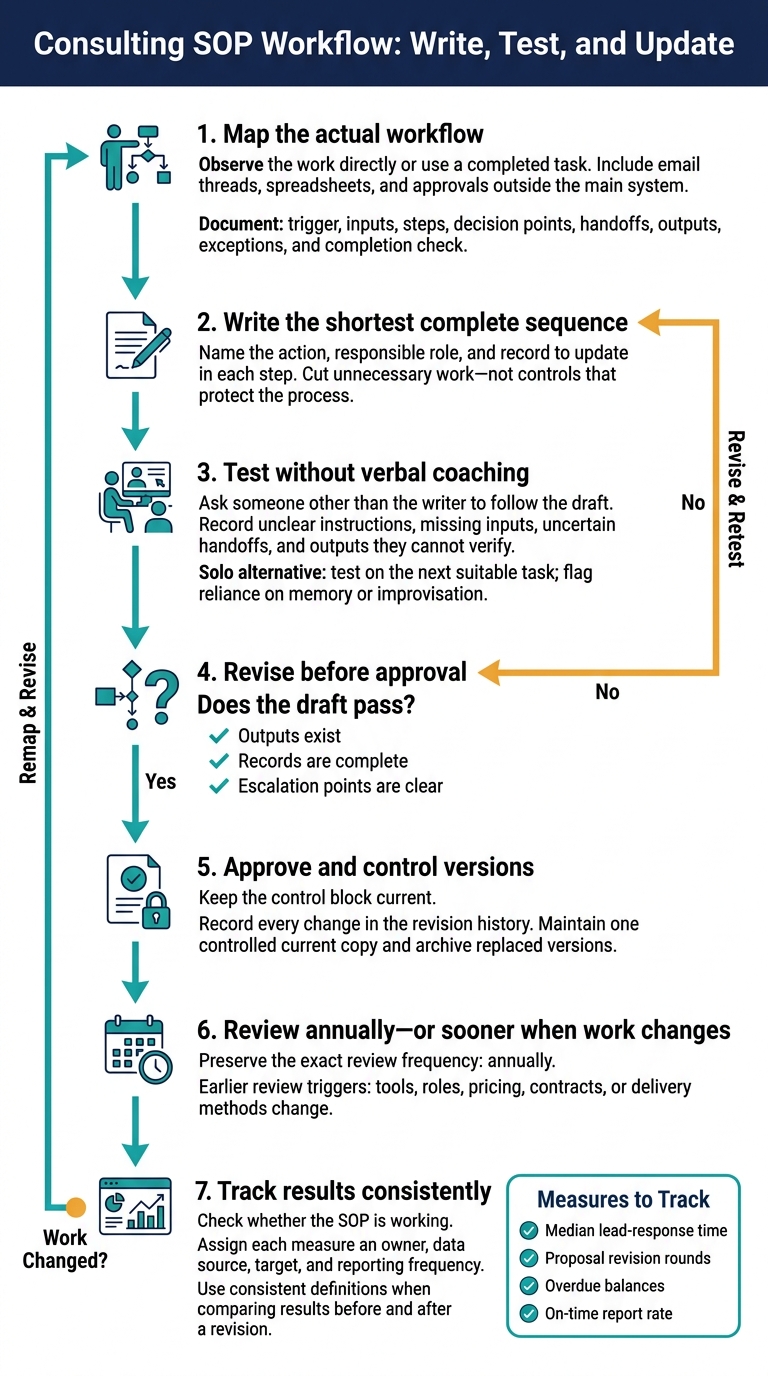 Once you’ve drafted the SOP, test it against a completed task before putting it into use.
Map the Steps and Test the Draft
Start with the actual workflow. If you can’t observe it directly, use a completed task as your example. Include email threads, spreadsheets, and approvals that happen outside the main system. Document the trigger, inputs, steps, decision points, handoffs, outputs, exceptions, and completion check. Then write the shortest complete sequence, naming the action, responsible role, and record to update in each step. Cut unnecessary work - not controls that protect the process.[2][7]
Ask someone other than the writer to follow the draft without verbal coaching. Record unclear instructions, missing inputs, uncertain handoffs, and outputs they can’t verify. Revise the draft before approval. Working alone? Test it on the next suitable task and flag any point where you rely on memory or improvise. The draft passes only when outputs exist, records are complete, and escalation points are clear.[2][7]
Set Review Dates and Track Results
Keep the control block current and record every change in the revision history. Maintain one controlled current copy and archive the versions it replaces. Review the SOP annually - or sooner if tools, roles, pricing, contracts, or delivery methods change.[2][7]
Track median lead-response time, proposal revision rounds, overdue balances, and on-time report rate to check whether the SOP is working. Assign each measure an owner, data source, target, and reporting frequency. Use consistent definitions when comparing results before and after a revision.[3]
Use the Lead Follow-Up SOP for Microsoft Co-Sell
Use the same lead-follow-up structure, adding the Microsoft co-sell fields partners need: account coverage, validated customer contacts, campaign attribution, internal contacts, and an owner and due date for each client- or Microsoft-facing action. State who resolves duplicate records or unclear ownership. Update Partner Center whenever the stage, close date, or ownership changes.[5][6]
Microsoft states that accepted Joint Planning leads must be acted on within 60 days or they automatically close as lost. Assign follow-up well before that deadline.[4]
Conclusion: Assign Owners and Check Completion
Give each SOP one accountable owner who keeps the procedure current and closes any ownership gaps.
Completion belongs in the record, not just in someone’s memory. Define “done” with evidence someone else can check. State which records prove completion and how long to keep them. Document decisions and exceptions. For each temporary exception, include the reason, approver, corrective action, and review date.
Then test the SOP on one recurring task. Use a plain format, check it against actual work, and reuse that layout for the next workflow. Follow the same approach for lead follow-up, discovery calls, proposal review, invoicing, and client reporting.
When tools, roles, or contracts change, update the SOP itself - not just its review date - so people can follow the procedure and the owner can verify the results.
FAQs
Which consulting task should I standardize first?
Start by standardizing your discovery call. Use it to confirm the client’s exact goal and pinpoint the problems they’re trying to solve. Then tie the work in your proposal and scope directly to business outcomes, so you and the client stay on the same page later [1][2].
How can I adapt SOPs without limiting client-specific judgment?
Build a repeatable workflow with clear inputs, decision points, deliverables, and scope boundaries. Leave room for judgment based on what discovery reveals. Tie each step to the client’s objectives so your team can tailor the content without changing the workflow.
Use templates to record challenges, the value of each work item, next actions and dates, and required confirmations. Set clear expectations to avoid unpaid work and scope creep. After each project cycle, update the templates with lessons from client calls.
How much SOP detail does a solo consultant need?
A solo consultant needs “just enough” SOP detail to avoid unpaid work and deliver consistently. Keep documents short and easy to scan. Define the scope and timeline, often for a fixed-fee project. Explain what happens next, when clients can expect value, and include a checklist for follow-up and weekly tracking.
Barron Tech emphasizes one-page mappings and tight scope because they’re easier to sell and deliver consistently.