
Who Owns What in Microsoft Co-Sell Teams?
Assign one named owner, due date, and system for every Microsoft co-sell task; track outreach, funding, and weekly reviews.
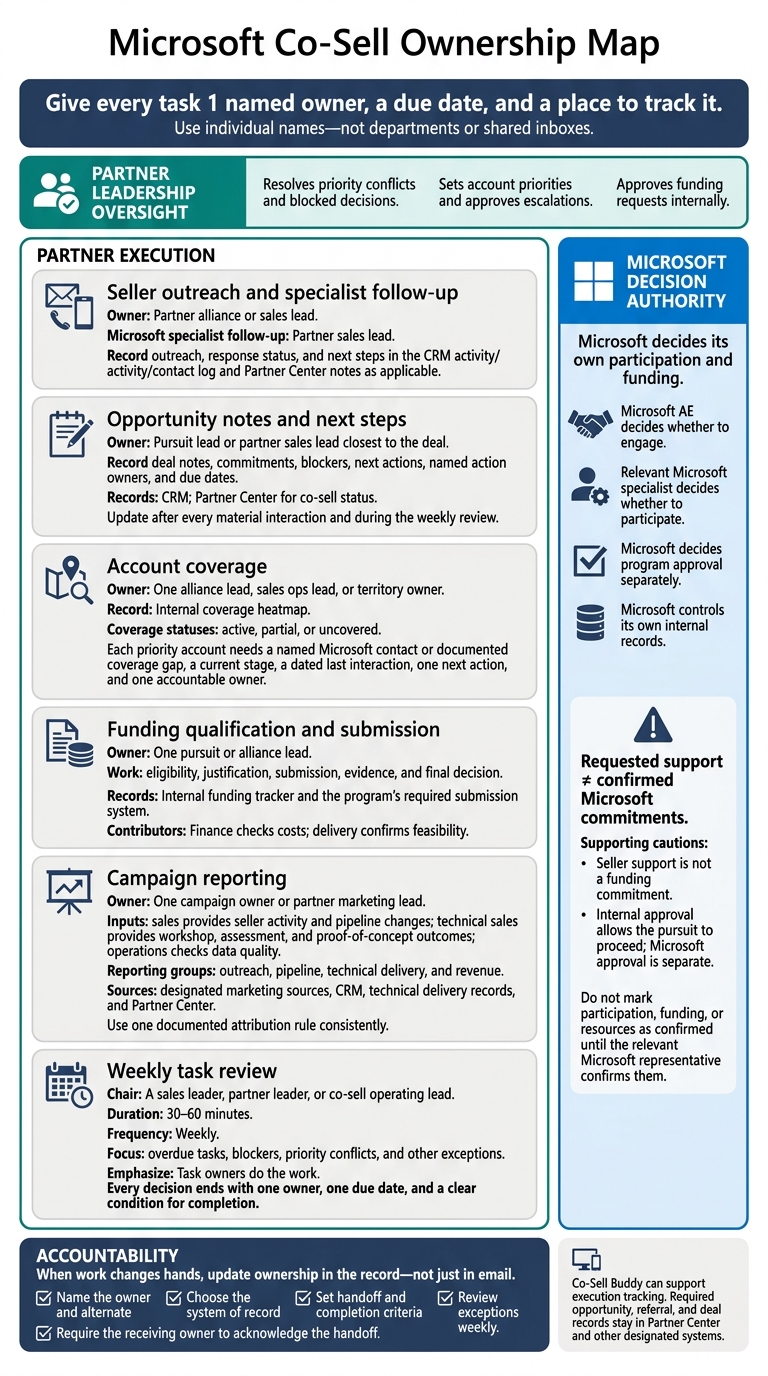
I use one rule for Microsoft co-sell work: give every task 1 named owner, a due date, and a place to track it. Your partner team runs the work. Microsoft decides its own participation and funding. Partner leadership resolves conflicts and blocked decisions.
Here’s how I divide the work:
- Sales or alliance lead: Seller outreach and specialist follow-up.
- Pursuit or sales lead: Deal notes, commitments, and next steps.
- Alliance or sales ops lead: Account coverage and contact gaps.
- Pursuit or alliance lead: Funding checks, submissions, and evidence.
- Marketing lead: Campaign reporting, with sales, technical, and data checks.
- Partner or sales leader: A weekly, 30–60-minute review of overdue tasks and blockers.
I keep requested support separate from confirmed Microsoft commitments. When work changes hands, I update the owner in the record - not just in email. Co-Sell Buddy can help track tasks, while required deal records stay in Partner Center and other assigned systems.
Microsoft co-sell playbook: From co-sell ready to closed-won
Who Owns Seller Outreach and Deal Updates?
The partner owns outreach, follow-up, and deal updates. Microsoft decides whether and how to engage. Microsoft sellers and specialists base that decision on account coverage, customer need, solution fit, capacity, and internal priorities. Don’t mark participation, funding, or resource commitments as confirmed until the relevant Microsoft representative confirms them.[4][3]
| Task | Recommended partner owner | Contributors | Approver or decision authority | Handoff trigger |
|---|---|---|---|---|
| Azure AE outreach | Partner alliance or sales lead | Pursuit lead, technical sales, marketing | Partner sales leader for high-risk or strategic accounts; Microsoft AE decides whether to engage | Account team identified, opportunity qualified, and specific ask ready |
| Microsoft specialist follow-up | Partner sales lead | Technical sales, pursuit lead, Microsoft AE | Relevant Microsoft specialist decides whether to participate | Specialist need identified or customer technical requirement confirmed |
| Opportunity notes | Pursuit lead or partner sales lead closest to the deal | All contributors who own actions | Partner sales leader checks completeness; Microsoft controls its own internal records | Any material customer or Microsoft interaction, status change, blocker, or new commitment |
Who Handles Azure AE Outreach?
Make the first external message specific. Include the customer problem, business impact, relevance to Microsoft, deal stage, timing, and one clear ask - not a general request for support.[5][6]
Set follow-up and escalation intervals before you send it.
A team can follow up after 3 business days, verify account ownership and territory after 5 business days, and escalate to the partner channel or alliance contact after 7 business days if the deal has a near-term customer milestone.
These are suggested internal rules, not Microsoft response commitments. Before escalating, check the applicable Partner Center sharing workflow and seller-visibility settings. Keep the original ask intact and explain what a delay means for the deal.[3][6]
Who Handles SSP Follow-Up?
The partner sales lead owns follow-up, but should verify the Microsoft contact’s role before routing the request. SSP isn’t a standard Microsoft role across accounts.
Restate the customer need, recap the last interaction, and request a joint action with a proposed owner and due date. Send architecture, sizing, and technical-risk questions to partner technical sales and the appropriate Microsoft technical specialist. A session request is not confirmation that Microsoft will attend.[5]
Who Keeps Opportunity Notes Current?
Outreach should feed into the opportunity record. Assign the pursuit lead or partner sales lead closest to the deal as the single owner of opportunity notes. Update them after every material interaction and during the weekly review.
At a minimum, record the customer objective, opportunity stage, estimated close date, Microsoft involvement, seller and specialist contacts, latest interaction, blockers, next action, named action owner, and due date. Keep confirmed facts separate from assumptions, and note when Microsoft hasn’t accepted or committed to an action. Partner Center’s notes section lets teams view opportunity details and collaborate with Microsoft sellers or other partners.[2]
| Activity input | Update location | Completion standard |
|---|---|---|
| Customer objective and business outcome | CRM opportunity record and Partner Center opportunity details | Written in the customer’s terms, with a measurable outcome where available |
| Azure AE or Microsoft account-team outreach | CRM activity log and Partner Center notes | Contact, date, message purpose, response status, and next step recorded |
| Specialist or SSP follow-up | CRM activity log and Partner Center notes | Correct Microsoft role identified; joint action, owner, and due date recorded |
| Technical discovery | CRM opportunity record and technical work-tracking system | Architecture needs, assumptions, risks, and open technical questions documented |
| Blocker or escalation | CRM risk log or opportunity record | Business impact, escalation path, responsible owner, and target resolution date documented |
| Weekly review decision | Team task tracker and opportunity record | Each open task has one owner, due date, and status |
Use this same record for team reviews of account coverage and funding requests.
Who Owns Account Coverage and Funding Requests?
Account coverage and funding need separate owners. After outreach and notes, confirm who owns each responsibility.
| Responsibility | Owner | Contributors | Approvers or decision authority | System of record | Completion standard |
|---|---|---|---|---|---|
| Account heatmap | One alliance lead, sales ops lead, or territory owner | Account and pursuit leads; technical sales; marketing | Leadership sets account priorities and approves escalations | Internal coverage heatmap | Each priority account has a named Microsoft contact or documented coverage gap, a current stage, a dated last interaction, one next action, and one accountable owner |
| Funding qualification and submission | One pursuit or alliance lead | Finance checks costs; delivery confirms feasibility | Leadership approves the request internally; Microsoft decides program approval separately | Internal funding tracker and the program’s required submission system | Eligibility is confirmed; justification, amount, deadline, and required documents are recorded |
Who Maintains the Account Heatmap?
The owner updates the heatmap after meaningful Microsoft seller interactions and before the weekly co-sell review. Mark coverage as active, partial, or uncovered, and keep portfolio coverage separate from deal execution.
Bring coverage gaps into the same weekly review used for funding requests.
Who Manages the Funding Request?
Assign one pursuit or alliance lead to handle eligibility, justification, submission, and evidence. Record the customer, opportunity ID, program, requested amount ($), deadlines, reviewers, status, and next action. This owner also collects the required evidence and records the final decision.
Link to the current program guidance and required evidence. Check enrollment, submission, and claims requirements before committing resources.
Internal approval allows the pursuit to proceed; Microsoft approval is separate. Microsoft’s decision depends on the program’s eligibility rules, documentation, timing, and available budget. Seller support is not a funding commitment. Don’t promise eligibility before the program review.
Carry open funding items into the weekly task review.
Who Owns Campaign Reporting and Task Reviews?
Who Reports Campaign Results?
One campaign owner or partner marketing lead owns the report. This person brings the inputs together, applies one attribution rule, publishes the scorecard, and flags decisions for leadership.
Sales provides seller activity and pipeline changes. Technical sales provides workshop, assessment, and proof-of-concept outcomes. Operations checks for duplicates, missing owners, inconsistent stages, stale dates, and mismatches between the CRM and Partner Center. The scorecard then guides the weekly review.
Group the report into outreach, pipeline, technical delivery, and revenue. For each metric, document the source and attribution rule once, then keep them fixed. Pull data from designated marketing sources, the CRM, technical delivery records, and Partner Center, and check current Microsoft definitions. An accepted opportunity is not the same as qualified pipeline. Include funding, follow-up time, and Marketplace metrics only when relevant. Archive dated Partner Center exports.[7]
Who Leads the Weekly Task Review?
With the scorecard up to date, use the weekly review to address exceptions. A sales leader, partner leader, or co-sell operating lead chairs the review. Task owners do the work. Keep the meeting to 30–60 minutes, and focus on exceptions instead of reading every status update.
Leadership resolves priority conflicts and blockers. Every decision should end with one owner, one due date, and a clear condition for completion.
| Workstream | Accountable owner | Source of truth | Review frequency | Team-defined escalation threshold |
|---|---|---|---|---|
| Campaign results | Campaign owner | Marketing platform and CRM | Weekly | Report more than 2 business days late |
| Seller follow-up | Sales owner | CRM and contact log | Weekly | No response after 2 documented follow-ups |
| Coverage gaps | Alliance lead | Account heatmap | Weekly | Priority account still has a coverage gap |
| Opportunity notes and movement | Pursuit owner | CRM; Partner Center for co-sell status | Weekly | Missing next step or no stage change for 14 days |
| Technical outcomes | Technical sales owner | Workshop or delivery record | Weekly | No next step within 5 business days of completion |
| Data quality | Operations owner | CRM, Partner Center, campaign export | Weekly | Missing owner, stage, value, or next-step field |
| Funding status | Funding owner | Funding tracker and approval record | Weekly | Decision exceeds the agreed internal deadline |
| Priorities and blockers | Co-sell operating lead | Decision log | Weekly | Blocker persists for 2 consecutive reviews |
These thresholds are internal operating rules, not Microsoft requirements. Adjust them to fit your sales cycle and approval process. Urgent issues shouldn’t wait for the next meeting.
How Can Co-Sell Buddy Help Track Ownership?
Barron Tech’s Co-Sell Buddy can track account mapping, coverage, ownership, follow-ups, and assigned campaign work.[1] It helps teams see who owns the next action and which accounts lack coverage.
Keep required opportunity, referral, and deal records in Partner Center and other designated systems of record. Use Co-Sell Buddy to support execution. Don’t assume it integrates with Microsoft or provides verified revenue reporting unless those capabilities have been confirmed.
Conclusion: Assign Owners and Review Open Issues Weekly
Give each workstream one named owner, and record every handoff in the system of record.
Before the next weekly review, complete this checklist:
- Name the owner and alternate. Use individual names - not departments or shared inboxes.
- Choose the system of record. Use the assigned system for each workstream, and link records using account and opportunity IDs.
- Set handoff and completion criteria. Include the requested action, deadline, evidence, and acceptance criteria. Require the receiving owner to acknowledge the handoff.
- Review exceptions weekly. Address overdue, blocked, stale, or unowned work. Record decisions and revised dates, and escalate customer-impacting issues immediately.
When work changes hands, update ownership in the record, not just in an email. Each month, audit a sample of opportunities for missing next steps and unclear accountability.
FAQs
Can one person own multiple co-sell roles?
Yes, one person can handle multiple co-sell roles. But clear accountability keeps work moving. Partner Seller, Alliance Leader, Partner Manager, and Operations remain separate roles, even when the same person wears several hats.
Give every stalled opportunity or task one named owner and a specific next action. Whether responsibilities sit with one person or span a team, keep account context and follow-up in one central record.
Who takes over when a task owner is unavailable?
When a task owner is unavailable, the partner seller should first try to finish the task or fix the issue. If they can’t, the alliance leader takes responsibility. If the task is still blocked, escalate it to operations or administration for a final decision. That decision may include lifting a reporting freeze if needed [1].
How should we handle deals awaiting Microsoft approval?
Pending approval is part of active pipeline management. Keep documentation ready for an audit: check Partner Center deal details, update account and relationship maps, and confirm the assigned Azure AE or SSP. These checks help prevent confusion and duplicate claims.
For ECIF or MACC delays, document the customer path and funding requirements. If a request is rejected, record the reason, correct the evidence, and resubmit. Use regular pipeline reviews to assign an owner and a clear next action.