
Q&A: Customer References in Microsoft Co-Sell
A few recent, seller-ready customer references with clear proof and 90-day refreshes beat large, stale libraries for Microsoft co-sell.
If I want Microsoft sellers to take my co-sell motion seriously, I need a small set of current customer proof that I can send fast.
Here’s the short answer: I do not need a huge library of references. I need a few strong customer examples, clear proof assets, clean Partner Center account data, and a simple update process every 90 days.
At a glance, this article says I should focus on:
- A small set of recent references, not a long list
- Two types of proof: live customer references and written proof assets
- Seller-ready details like customer name, location, solution, contact, timeline, and results
- Named, managed, and unmanaged accounts so I know when Microsoft field teams are part of the motion
- Regular review cycles to keep references current after new wins, offer changes, or program updates
A few points stand out right away:
- A live customer contact is not the same as a case study or one-pager
- Microsoft sellers often make fast decisions, so proof has to be easy to scan
- Account errors in Partner Center can slow routing and send deals to the wrong team
- The article recommends checking references every 90 days
Referrals: Creating a Co-sell Deal
Quick Comparison
| Item | What it is | Best use |
|---|---|---|
| Live reference | A customer willing to speak or join an intro | When a seller wants direct customer confirmation |
| Proof asset | A one-pager, case study, or recorded win | When written proof is enough to keep the deal moving |
| Managed account | An account with Microsoft field coverage | When I need AE, SSP, ATS, or funding support |
| Unmanaged account | An account without direct field coverage | When I lead the motion myself |
In short, the article is about keeping proof current, specific, and easy to use so Microsoft sellers can match it to a deal without extra work.
How many customer references should you keep ready
Keep a small set of strong, recent references instead of building a huge catalog. What matters is fit, not volume. Each reference should be current, tied to a clear solution area - Azure, App Innovation, Data and AI, Modern Work, or Business Applications - and easy to pull up when a Microsoft seller asks for proof.
When that request comes in, speed matters. You want the right example fast, not a long list of generic wins.
Once you have that core set in place, split live references from proof assets.
Keep a small reference set
A handful of well-matched references usually does more work than a big, messy library. The goal is simple: keep references that are recent, relevant, and easy to map to the deal in front of you.
Separate referenceable customers from proof assets
This is where many teams get tripped up. A referenceable customer is a live contact who is willing to join an introduction or take a call. A proof asset is a document - such as a one-pager, a short case study, or a verifiable win - that shows actual deployment results without needing a live customer intro.
Not every deal needs a customer call. In many cases, a solid proof asset is enough to keep things moving. That’s why it helps to organize both live references and proof assets by:
- solution area
- industry
- deal type
A matched reference is more useful than a generic success story.
That split also makes it easier to prepare for the specific deal details Microsoft sellers usually ask for.
What Microsoft sellers typically ask for
Once you have a small reference bench, the next step is simple: give sellers the exact fields they look for. Microsoft sellers make fast calls on whether a reference fits a deal, so the details need to be easy to scan and ready to use.
Core customer and deal details to have on hand
Have the basics ready: the exact customer name, city and state, deployed solution, the business problem it solved, the contact, and any Microsoft sellers already tied to the account [2][3]. If the account is referenceable, add the customer contact’s name, title, and email.
Also note any Microsoft AEs, SSPs, or ATSs already attached to the account [2][3]. That matters because sellers use those fields to check both fit and ownership. If the account data is fuzzy, things can get messy fast.
Proof that the solution actually worked
A reference only means much if it shows the solution did something concrete. Include whether the project is live or still in pilot, the timeline, and results you can measure with numbers [1][2].
Skip the salesy phrasing. Plain facts work better here:
- Live or pilot
- Timeline
- Measurable results such as cost savings, time saved, efficiency gains, or Azure consumption
That kind of detail gives a seller something they can use right away instead of something they have to decode.
Why account accuracy in Partner Center matters
Bad account data slows routing and can send the reference to the wrong field team [2][3]. Match the customer name to what appears in Microsoft systems, and keep the location and contact details up to date.
It also helps to keep the Microsoft relationship map with the account record. That way, the right seller can move fast instead of spending time sorting out who owns what.
For accounts tied closely to Microsoft, named-account status adds another layer of context.
When named and managed accounts help
 When the account matters to Microsoft, named and managed status can make the reference easier to act on.
Use named accounts when the Microsoft relationship is relevant
Use named accounts when Azure consumption, Microsoft funding, or field support sits at the center of the ask. Naming the account helps you line the deal up with Microsoft funding motions like MACC (Microsoft Azure Consumption Commitment) and ECIF (End Customer Investment Funds) [2], and shift from broad account planning to a seller-ready ask, like an introduction, funding support, or field alignment [1][3].
Once the account is named, the next step is simple: check whether Microsoft has a field team attached.
Microsoft Managed vs. Microsoft Unmanaged accounts
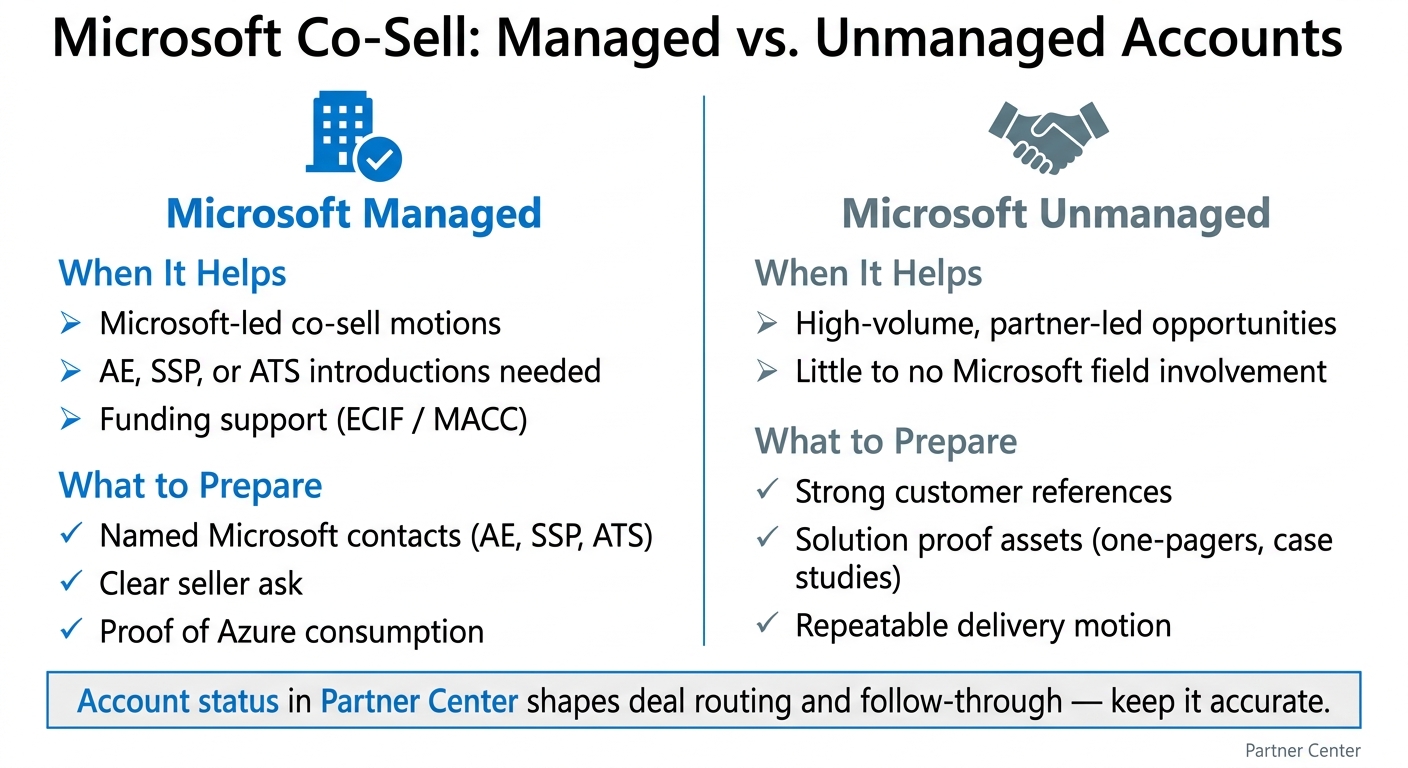
In Partner Center, account status shapes routing and follow-through. Managed accounts have assigned Microsoft field teams - Account Executives (AEs), Specialist Sales Professionals (SSPs), and Azure Technology Specialists (ATSs) - so opportunities route straight to those sellers [2][3]. Unmanaged accounts usually don’t have dedicated field coverage, which means the partner leads the motion.
| Account Status | When It Helps | What the Partner Should Prepare |
|---|---|---|
| Microsoft Managed | When you need Microsoft-led co-sell, AE/SSP introductions, or funding support like ECIF/MACC | Named Microsoft contacts and a clear seller ask with proof of Azure consumption |
| Microsoft Unmanaged | When you are pursuing higher-volume, partner-led opportunities with little Microsoft field involvement | Strong customer references, solution proof assets, and a repeatable delivery motion |
How often to update references and proof assets
Refresh on a schedule and after major changes
Once your references are in order, don’t let them sit. Review them every 90 days and any time something big changes. A new customer win, a shift in your core offer, or an update to Microsoft funding programs like ECIF or MACC should trigger a refresh right away instead of waiting for the next review cycle [1][2].
Why does that matter? Because stale references fall apart in the same fast scan sellers use to judge fit.
What to update in each refresh
Each review should follow the same short checklist. Keep it tied to the exact details Microsoft sellers look for. This should build on the fields already covered earlier, not turn into a separate maintenance process.
- Confirm the customer still agrees to be a reference
- Verify contact names, titles, and email addresses for both the customer and your internal account owner
- Check that the deployment summary matches what you sell today
- Update outcome metrics with current numbers, such as cost savings, time to value, or Azure consumption growth
- Align product and designation names with current Microsoft naming
- Confirm the case study targets an industry Microsoft field teams are prioritizing
This gives sellers proof that matches today’s offer, today’s account, and today’s Microsoft motion.
Conclusion: Keep proof current, specific, and easy to use
Current proof cuts seller review time and helps move the next co-sell conversation along. If this starts to feel like one more process to manage, Barron Tech’s Co-Sell Buddy is built to help Microsoft partners keep seller-ready reference assets and co-sell proof points in shape without turning the work into a spreadsheet management project [3].
Keep references current, specific, and easy for sellers to use.