
Seller ownership checklist for co-sell deals
Six-field checklist to verify Microsoft seller ownership for co-sell deals: named seller, account fit, funding, contacts, next steps, and reviews.
I treat seller ownership as confirmed only when a named Microsoft seller acknowledges the specific deal - not just the account. Before requesting support, I check six fields and link each one to dated proof:
- Named seller: Who accepts responsibility for this opportunity?
- Account fit: Does the solution match the buying entity and its needs?
- Funding path: Are the budget, purchase route, and any required funding confirmed?
- Contact history: Have both the seller and customer responded with decisions or agreed actions?
- Next-step owner: Has one person accepted a specific task and deadline?
- Review timing: Is the next review scheduled, with rules for checking sooner?
My rule: missing proof means unverified. Seller interest is not funding approval, and a Marketplace offer’s acceptance is not a purchase. I keep gaps visible, assign someone to resolve them, and use Co-Sell Buddy for coordination - not as proof of Microsoft approval.
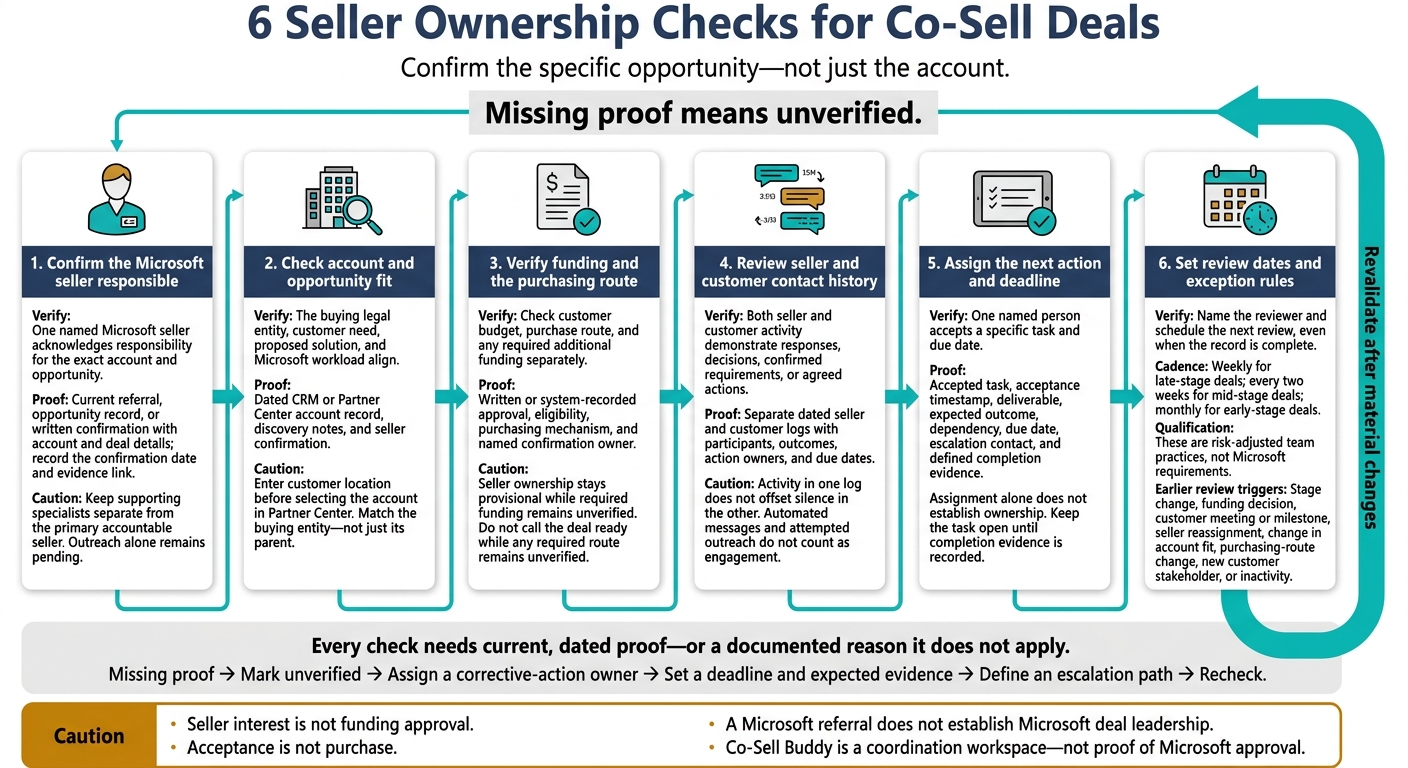
Steps 1–2: Check seller ownership and account fit
Step 1: Confirm the Microsoft seller responsible
Record one accountable Microsoft seller for the account and opportunity. Keep specialists, partner sales, and partner technical contacts separate.[4]
- [ ] Record the primary seller’s full name, role, Microsoft market or region, account coverage, and work email.
- [ ] Add the account or opportunity identifier, if available, along with the confirmation date and a link to current ownership evidence.
- [ ] List supporting Microsoft specialists and their scope separately from customer and partner contacts.
Use this table to classify responsibility.
| Ownership status | Evidence | Acceptable proof | Risk | Required correction |
|---|---|---|---|---|
| Confirmed | Seller confirms responsibility for the exact account and opportunity | Current referral, opportunity record, or written confirmation with account and deal details | Low; coverage can change | Record the confirmation date and primary seller |
| Shared | Several Microsoft sellers or teams participate | Joint account-planning notes naming one primary accountable person and supporting roles | Duplicate outreach or stalled decisions | Name one person accountable for customer coordination, the next decision, and escalation |
| Unverified | A contact exists, but current coverage is unclear | None yet; an old introduction, forwarded email, or generic alias is insufficient | Misrouted support request | Confirm current coverage before requesting deal support |
For Microsoft-managed accounts, you still need to record the named seller accountable for the opportunity.[6] Then verify that the account and opportunity map to the same customer entity.
Step 2: Check account and opportunity fit
Once you’ve confirmed the seller, check that the account and opportunity match the buying entity and its current need.
In Partner Center, enter the customer location before selecting the account. Compare the suggested account with your CRM record, and verify that it matches the buying legal entity - not just its parent.[1][6] Attach a dated source for each check. Mark gaps as Fail - unverified and record the correction needed.
- Customer identity - [ ] Pass / [ ] Fail: Confirm the legal entity, subsidiary, geography, and industry. Evidence/gap: CRM record, customer domain, or Partner Center account selection.
- Buying group and coverage - [ ] Pass / [ ] Fail: Identify customer stakeholders, the problem owner, and the Microsoft team covering that entity and workload. Evidence/gap: Customer meeting notes and seller confirmation.
- Problem and solution - [ ] Pass / [ ] Fail: Link the customer’s documented need to the proposed solution. Evidence/gap: Requirements or discovery notes.
- Microsoft alignment - [ ] Pass / [ ] Fail: Name the specific technology or workload. Evidence/gap: Solution design and applicable solution area or solution play.[2]
- Outcome and timing - [ ] Pass / [ ] Fail: Record the customer’s measurable target and why seller involvement is needed now. Evidence/gap: A documented business objective and a specific request.
Keep deal leadership, referral origin, and purchasing route in three separate fields. A Microsoft referral does not establish Microsoft deal leadership, and Marketplace intent does not establish seller ownership.[3][5]
Steps 3–4: Check funding and contact history
Once seller and account fit are confirmed, check whether the deal has a valid path to purchase or funding.
Step 3: Verify funding and the purchasing route
Check budget, purchase route, and additional funding separately. Mark each item unconfirmed until you have written or system-recorded proof. Seller ownership stays provisional while required funding remains unverified.
| Route or funding source | Qualification evidence | Confirmation owner | Timing risk | Required next action |
|---|---|---|---|---|
| Customer budget | Approved budget, purchase request, or procurement confirmation | Customer budget owner | Reallocation or expiration | Confirm amount, cost center, and approval date |
| Microsoft commercial marketplace | Eligible listing and documented purchase path | Customer contract owner and Microsoft seller | Offer expiration | Confirm purchase readiness and target date |
| Microsoft commitment or MACC path | Written offer and account eligibility confirmation | Microsoft seller or specialist | Commitment term expiration | Obtain written validation and reference |
| Partner funding | Funding approval, scope, and reimbursement terms | Partner funding owner | Submission or reimbursement cutoff | Confirm approval, eligible costs, and deadlines |
| Program funding | Current registration, eligibility evidence, and official requirements | Named program owner | Rule changes or deadlines | Attach current guidance and registration or approval |
| No additional funding required | Confirmed customer budget and procurement route | Deal owner and customer contract owner | Pending internal approval | Document why additional funding is unnecessary |
- [ ] Record each item’s status, evidence link, named confirmation owner, customer account or tenant, and restrictions.
- [ ] For Microsoft commercial marketplace, verify the billing account ID when required, purchase permissions, tenant restrictions, deployment prerequisites, and who will accept and purchase. Acceptance is not purchase.[7][8]
- [ ] Before claiming MACC impact, verify the offer’s Azure benefit eligibility, the customer’s active MACC term, and the Azure portal purchase path.[9]
- [ ] For applicable programs, record when the guidance was checked, the account it applies to, and any restrictions. Track registration, nomination, purchase, deployment, and reimbursement deadlines separately, using exact dates, times, and time zones. If no program applies, mark not required and document why.
Set a confirmation deadline for missing approvals or eligibility checks before the next stage review. Escalate missed deadlines, unknown purchasing authority, or expiring offers. Do not call the deal ready to proceed while any required route remains unverified.
Step 4: Review seller and customer contact history
After verifying funding, check whether recent seller and customer activity still supports the ownership claim.
Keep seller and customer activity in separate logs. Seller participation does not prove buyer engagement, and buyer activity does not prove the seller has current deal context. Count responses, decisions, confirmed requirements, and agreed actions - not automated messages or attempted outreach. Confirm that the named seller still owns the next move.
- [ ] For each interaction, record the date, time zone, channel, participants, roles, initiator, topic, outcome, action owner, due date, and evidence link.
- [ ] In the seller log, confirm receipt of current deal context, opportunity stage and value, customer needs, funding route, and the specific support request.
- [ ] In the customer log, record buyer participation, procurement status, decision process, technical validation, and the next customer commitment.
Use evidence from both logs to assign the engagement status below. Treat these thresholds as team policy: activity in one log does not offset silence in the other.
| Engagement status | Recency and response test | Required evidence | Action |
|---|---|---|---|
| Active | Seller and customer interaction within 14 days | Recent meeting, response, or confirmed action | Keep ownership active and maintain the next milestone |
| At risk | No progress within 15–30 days, delayed response, unclear commitment, or unresolved funding or procurement blocker | Unanswered outreach, missed commitment, or stale opportunity field | Escalate, reset the next action, and assign a recovery deadline |
| Inactive | No seller or customer activity beyond the team’s inactivity threshold, such as 30 or 45 days, with no supported next step | Stale record and absent buyer activity | Requalify, move to nurture, or close out the opportunity |
Flag ownership for revalidation if the seller has not acknowledged the opportunity, buyer roles are missing, the latest note lacks an outcome, or the stage conflicts with recorded activity. Each flag needs a specific correction: obtain seller acknowledgment, identify the buyer, confirm the interaction’s outcome, or correct the opportunity stage and unsupported ownership claim.
Steps 5–6: Assign actions and schedule reviews
Step 5: Assign the next action and deadline
Once ownership is confirmed, assign the next action and record acceptance. Assignment alone does not establish ownership - the person must accept the task. Reject vague tasks such as “follow up” or “check funding.” Before assigning work, define the question to resolve and the proof needed.
- [ ] Record one named accountable person, a specific deliverable, expected outcome, dependency, due date, and escalation contact. Reassign immediately if that person lacks access to the customer, Microsoft seller, funding contact, or Partner Center record.
- [ ] Ask the owner to accept the task in the deal record or workflow and restate the deliverable and due date. Record the acceptance timestamp.
- [ ] Define completion evidence before work starts. Proof can include a dated Partner Center note, a meeting summary with attendees and decisions, customer or seller email confirmation, a funding-program response, updated CRM activity, or a documented customer milestone. Keep the task open until the evidence is attached, linked, or summarized in the deal record.
Example: [Name] confirms [deliverable] with [contact] by [date]. Log the response or escalation if no reply.
Step 6: Set review dates and exception rules
After assigning the next action, set a review schedule to keep all six ownership checks current. Revisit each check as the deal changes.
Use a team-set cadence: weekly for late-stage deals, every two weeks for mid-stage deals, and monthly for early-stage deals. These are risk-adjusted team practices, not Microsoft requirements. Name the reviewer and schedule the next review even when the record is complete.
Schedule an earlier review after a stage change, funding decision, customer meeting or milestone, seller reassignment, change in account fit, purchasing-route change, new customer stakeholder, or inactivity. Shorten the interval when a decision or deadline is near.
Mark validation complete only when every field has current proof or a documented reason it does not apply. “Current” means verified during the latest review or after any material change. Keep missing proof visible, along with a corrective action, named owner, deadline, expected evidence, and escalation path.
Review the 6 ownership checks
Confirmed account ownership does not establish active engagement on a specific deal. Record the seller’s deal acknowledgment separately from account ownership. Each accountable-owner role in the table must map to a named individual in the deal record.
| Field | Status | Proof | Accountable owner | Review trigger |
|---|---|---|---|---|
| Named seller | Confirmed / pending / gap | Seller name, role, account alignment, and deal acknowledgment; outreach alone remains pending | Partner lead | Seller reassignment, no response, or account ownership change |
| Account fit | Confirmed / pending / gap | Customer need, solution fit, and Microsoft account context | Account owner | Scope change, customer milestone, or solution-area change |
| Funding path | Confirmed / pending / gap | Route, eligibility, purchasing mechanism, and responsible contact | Commercial or partner lead | Funding decision, procurement change, or offer revision |
| Contact history | Current / stale / gap | Dated customer and seller interactions, participants, topics, and outcomes | Opportunity owner | No interaction by next review date or missed meeting |
| Next-step owner | Confirmed / gap | Named person, accepted task, deliverable, outcome, dependency, due date, and escalation path | Opportunity owner | Task overdue, dependency blocked, or stage change |
| Review cadence | Scheduled / gap | Next review date, cadence rationale, attendees, and exception rules | Deal manager or partner lead | Stage change, funding decision, seller reassignment, milestone, or inactivity |
Conclusion: Keep the deal record current
Keep all six checks up to date: named Microsoft seller, account fit, funding path, contact history, next-action owner, and review cadence. Missing proof means unverified - not confirmed. Assign an owner for the correction, set a deadline, and define the escalation path.
Copy the deal review template
Use this record to track all six checks. Enter full U.S. dates and link to evidence in approved systems.
Deal name:
Account name:
Partner opportunity ID or Partner Center referral ID:
Microsoft seller name and role:
Seller email:
Ownership confirmation: Confirmed / Unverified / Disputed
Confirmation date:
Account-fit proof:
Funding source:
Purchasing route:
Last Microsoft seller contact: date, channel, summary
Last customer contact: date, channel, summary
Next action:
Action owner:
Due date:
Risk or blocker:
Evidence links:
Review cadence:
Next review date:
Exception rule:
Status:
Change log:
Keep the Partner Center referral reference so reviewers can trace the deal record back to the opportunity.
Track ownership and follow-up in Co-Sell Buddy
Use Barron Tech’s Co-Sell Buddy to log seller ownership, follow-up, and review dates. Treat it as a coordination workspace, not proof of seller responsibility, funding eligibility, or Microsoft approval. Each requires confirmation from an authoritative source.
After every seller or customer interaction, update the record, attach evidence, assign an owner to address any gap, and set the next review date.
FAQs
What if two Microsoft sellers claim ownership of my deal?
Review your account map, assigned seller roles, and existing records. Treat the account map as the source of truth for who was assigned to the account before outreach began.
Ask the sellers to settle ownership first. If they can’t agree, escalate to your alliance leader, then to operations or administration for a final decision. Keep the deal record out of reporting until that decision is documented.
Can my deal progress while funding is unverified?
Your deal can move forward while funding is pending, but funding remains a separate requirement. Keep clear records for potential audits. Don’t promise funding or mark it as confirmed until the relevant Microsoft representative validates it.
Document the customer path and funding requirements. Track funding status alongside the opportunity, and review open funding items weekly. If a request is rejected, record the reason, correct the evidence, and resubmit.
How do I maintain deal ownership during a seller transition?
Update the system of record right away - don’t rely on email or informal messages. Assign one owner per workstream and record the handoff’s requested action, deadline, and required evidence. The receiving owner must formally acknowledge the handoff in that record.
If a task owner is unavailable, seek resolution through the partner seller first, then the alliance leader, and then operations if needed. Audit opportunities regularly to confirm that next steps and accountability are clear.