
How to Track Co-Sell Success with Microsoft
Track co-sell progress with one weekly scorecard that combines Partner Center, CRM, seller activity, and campaign data to spot pipeline, stalls, and wins.
If you can’t answer “Is the pipeline moving?” in one weekly view, your co-sell tracking is too messy.
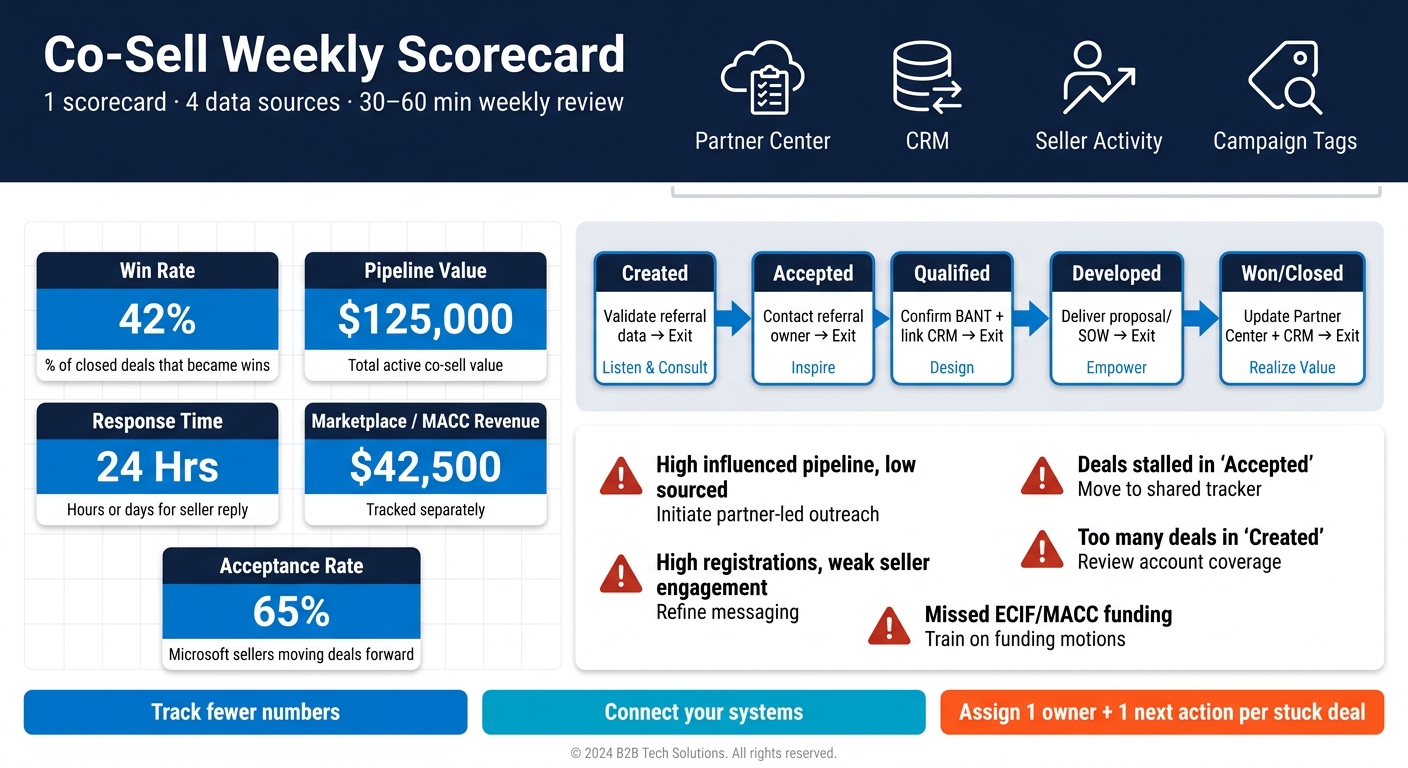
I’d keep this simple: build one scorecard, pull data from Partner Center + CRM + seller activity + campaign tags, and review it every week for 30 to 60 minutes. The scorecard should focus on just a few numbers: deal volume, win rate, pipeline value, response time, stage aging, and marketplace or MACC-linked revenue.
Here’s the whole idea in plain English:
- I’d start in Partner Center Referrals
- I’d track inbound vs. outbound co-sell deals
- I’d connect each referral to a CRM ID and Marketing Campaign ID
- I’d line up Partner Center stages with my CRM stages
- I’d review stalled deals, seller follow-up, and aging opportunities once a week
- I’d look for patterns like:
- lots of registrations but little seller response
- deals stuck in Accepted or Created
- pipeline from campaigns that doesn’t turn into wins
- missed MACC or funding-related opportunities
The main point: co-sell success is not about building a huge reporting system. It’s about using a short weekly scorecard to see what entered the funnel, what moved, what closed, and what got stuck.
A few metrics can tell the story fast:
- Win rate: how many closed deals turned into wins
- Pipeline value: total active co-sell value, such as $125,000
- Response time: how long it takes sellers to reply, in hours or days
- Marketplace or MACC revenue: tracked separately, such as $42,500
- Acceptance rate: whether Microsoft sellers are moving your deals forward
If I saw low sourced pipeline, weak seller engagement, or aging deals with no next step, I’d treat that as a process problem - not just a data problem.
So the short version is this: track fewer numbers, connect your systems, review them every week, and assign one owner plus one next action for every stuck deal.
Transforming Co-Selling with Microsoft: A New Era of Collaboration | BRK342
Build the Scorecard in Partner Center First
Start in Partner Center with Referrals and co-sell insights exports. That gives you the first version of a weekly scorecard without making things messy from day one.
Pull the right fields from Referrals and co-sell insights
In Partner Center, go to Referrals and export your referral records. The goal is simple: see what entered the funnel, what moved forward, and what needs cleanup.
Pull these fields:
- Engagement ID
- Referral ID
- Microsoft referral status
- sales stage
- CRM ID
- Marketing Campaign ID
- estimated deal value
- solution area
- partner role
- marketplace purchase intent
Use marketplace purchase intent to spot marketplace-led deals. [1]
Split headline metrics from diagnostic metrics
Put your metrics into three groups. This keeps the weekly review tight and stops the scorecard from getting bloated.
Headline metrics show whether the co-sell motion is producing results. Channel mix metrics show where deals are coming from. Funnel stage metrics help you figure out why the top-line numbers are off, like low acceptance rates, high rejection rates, or deals getting stuck before Microsoft approval.
| Metric Category | Metric Name | Partner Center Field Source | Interpretation |
|---|---|---|---|
| Headline | Co-Sell Pipeline | Referrals > Estimated Deal Value | Gross value of all active co-sell opportunities |
| Headline | Won Value | Referrals > Status (Won) | Actual revenue generated through the co-sell motion |
| Headline | Win Rate | Referrals > Status (Won/Lost) | Percentage of closed deals that resulted in a win |
| Channel Mix | Inbound vs. Outbound | Referrals > Referral Type / Direction | Whether Microsoft is sourcing deals for you or you’re registering your own |
| Funnel Stage | MSFT Acceptance Rate | Referrals > Referral Status | Quality of your registrations and Microsoft seller alignment |
| Funnel Stage | New Referrals | Referrals > Referral Status (Registered) | Consistency of the team in logging new opportunities |
| Funnel Stage | Approved Deal Value | Referrals > Status (Approved) | Value of deals that passed Microsoft’s initial validation |
Check the headline metrics first. If those numbers dip, then dig into the diagnostic metrics to see what’s going wrong.
Next, map CRM ID and Marketing Campaign ID so you can tie Partner Center records back to seller activity and campaign results.
Connect CRM, Seller Outreach, and Campaign Data
Use CRM and campaign IDs to tie Partner Center records to CRM activity.
Use CRM ID and Campaign ID to link records
Use CRM ID and Marketing Campaign ID as your keys. Match each Partner Center deal to one CRM opportunity tagged co-sell. Then map Marketing Campaign ID to the matching CRM campaign so you can compare pipeline value and win rate by campaign.
Once those records line up, seller activity and campaign performance show up in the same scorecard. That makes it much easier to see what’s happening without jumping between systems.
Track seller engagement and response time
These leading indicators help you spot motion before revenue shows up.
| Metric | What It Tells You |
|---|---|
| Response time (hours/days) | How fast Microsoft sellers respond to your outreach |
| Seller engagement rate | Whether sellers are actively involved |
| Account mapping sessions per quarter | How deep the alignment is with Microsoft sellers |
| Emails sent and meetings booked | The volume and consistency of outreach activity |
| Unique Microsoft seller contacts | How broad your relationship coverage is |
These signals show whether Microsoft sellers are leaning in before revenue appears.
Keep account maps, seller tasks, and outreach drafts in one place. If that work lives across scattered docs and inbox threads, it gets hard to see who owns what.
Measure campaign impact
Skip multi-touch attribution. Filter your referral data for deals where Marketing Campaign ID is populated, then review pipeline value by campaign and win rate by campaign.
A simple read can tell you a lot. If a campaign drives a lot of pipeline but closes poorly, the outreach may be bringing in interest without the right fit. If a campaign delivers a strong win rate on a smaller pipeline, that’s often a sign it deserves more budget or more seller attention.
With these links in place, you can map deals to sales stages and review where they stall.
Set Clear Stages and Review the Scorecard Weekly
Once CRM is linked, line up your stage definitions so Partner Center and CRM show the same deal status. When both systems match, stage mapping turns into a simple way to check deal movement instead of a separate reporting chore.
Map Partner Center stages to your sales stages
Match your internal stages to Microsoft’s co-sell stage model so your team and Microsoft sellers are working from the same playbook. When those stage definitions are locked in, your CRM reports and Partner Center reports should line up. If they don’t, check the exit criteria first.
| Co-sell Stage | Microsoft’s Co-Sell Stage Model | Exit Criteria | Next Action |
|---|---|---|---|
| Created | Listen & Consult | Referral data validated; initial account fit confirmed | Assign owner |
| Accepted | Inspire | Partner accepts referral in Partner Center | Contact referral owner |
| Qualified | Design | Budget, authority, need, and timing confirmed; customer meeting held | Link CRM record |
| Developed | Empower | Technical validation complete; solution proposal or SOW delivered | Request Microsoft support |
| Won/Closed | Realize Value | SOW signed; “Won” status updated in Partner Center and CRM | Trigger follow-up |
Once the stages match, your weekly review can stay focused on where deals get stuck and what needs to happen next.
Run a 30- to 60-minute weekly review
Use the scorecard to review exceptions, not every single opportunity. Keep the meeting to 30 to 60 minutes. Start with total pipeline value and new referrals. Then move to stage distribution, aging, and open risks.
A deal sitting in the same stage without a logged next action is a clear warning sign. When that happens, don’t leave the room with fuzzy ownership. Give each stalled opportunity one named owner and one specific next step before the meeting ends.
Wrap up with a short look back at wins, losses, and seller follow-up from the last 90 days.
Use the weekly review to spot repeat stalls, aging deals, and missing next steps.
Spot Early Signals and End with a Simple Action Plan
Find the most common pipeline gaps
Use the weekly review to turn exceptions into patterns you can act on.
Most co-sell gaps come from positioning, seller activation, or operating rhythm. Don’t just look at totals. Look at what the patterns are telling you. Each one should lead to one likely cause and one fast fix.
The table below maps common weekly review patterns to the scorecard inputs you already track: stage aging, source mix, seller response time, and campaign tags.
| Pattern | Likely Cause | Primary Corrective Action |
|---|---|---|
| High influenced pipeline, low sourced pipeline | Passive approach; waiting for Microsoft to bring deals | Target Azure-active accounts and initiate partner-led outreach with a clear ask |
| High registration volume, weak seller engagement | Vague ask or generic pitch that does not resonate with reps | Refine messaging around seller priorities and use seller-facing assets instead of broad decks |
| Deals stalled in “Accepted” | Context lost between CRM and outreach after acceptance | Move to a shared tracker for next steps |
| Too many deals stuck in “Created” | Missing relationship depth with the Microsoft AE or SSP | Review account coverage to find gaps and assign targeted follow-up tasks |
| Missed ECIF or MACC funding opportunities | Lack of alignment with Microsoft field incentives | Train sellers on solution-area funding motions and align the offer to MACC funding plays |
When several of these patterns show up in the same week, the problem usually isn’t tooling. It’s more often positioning, seller activation, or operating rhythm. A steady weekly cadence helps you spot bottlenecks fast.
Conclusion: Build 1 scorecard, review it weekly, and fix the gaps
One scorecard, clean data, aligned stages, and a weekly review turn co-sell into a process your team can run every week without guesswork. Consistent response times, clean stage updates, and strong follow-through help build seller trust.
FAQs
What should be in a co-sell scorecard?
A co-sell scorecard should pull Partner Center, CRM, seller outreach, and campaign data into one view. That gives your team a simple way to track execution and catch pipeline gaps before they turn into missed deals.
It should show account context, associated Microsoft sellers, and current coverage status. It should also include heatmaps for missing solution coverage, relationship depth, campaign assignments, and follow-up opportunities. Barron Tech’s Co-Sell Buddy is built to bring this workflow into one place.
How do I connect Partner Center to my CRM?
The article is less about wiring Partner Center straight into your CRM and more about running Microsoft co-sell in one shared operating flow - then moving the results into your CRM.
In plain English: set your co-sell scorecard metrics, decide on your weekly review stages, and keep that process tight. Then add the Microsoft seller, the relationship details, and the campaign or outreach context to your CRM records. That way, your pipeline stays consistent across both systems.
What should I do when co-sell deals stall?
Use your account heatmap and context data to see where the deal is slipping. Maybe solution coverage is missing. Maybe follow-up is too light. Either way, this helps you stop guessing and zero in on the actual gap.
Keep a clear operating rhythm by tracking shipped items, pending actions, and needed pushes in one execution workspace. If the pipeline still stalls, audit two things:
- Whether sellers have a clear ask
- Whether you are proving consumption