
How to Map Buying Committee for Co-Sell Deals
Map customer and Microsoft stakeholders, label roles, assign owners, and update after every meeting to prevent co-sell drift.
Most co-sell deals slow down because the team doesn’t know who decides, who influences, and who owns the next step. I fix that by mapping both sides of the deal in one place: the customer committee and the Microsoft sellers tied to the account.
Here’s the short version:
- I define role labels first so the team uses the same terms every time.
- I map 6 customer roles: champion, economic buyer, budget owner, user, technical evaluator, and blocker.
- I add 3 Microsoft roles: AE, SSP, and ATS.
- For each person, I track influence, stance, owner, concern, and last interaction.
- I keep the record in one shared account plan and update it after every meeting.
- I use meeting notes and last-touch dates to spot deal risk before it turns into drift.
That gives me a simple system to answer the questions that matter:
- Who can say yes?
- Who can stop the deal?
- Who at Microsoft is active now?
- Who owns the next intro or follow-up?
- Where are the gaps in coverage?
A map like this is not just a contact list. It’s a working deal record. If I don’t update it after each call, it goes stale fast. If I do, the team can see who matters, what changed, and what to do next.
Quick facts from the process:
- 6 customer-side role labels
- 3 Microsoft co-sell roles to track
- At least 5 core fields per stakeholder: name, role, influence, owner, and last interaction
- 1 shared source of truth for the full deal
So the main idea is simple: label the roles, map real names, assign ownership, record deal signals, and update the map after every meeting. That’s how I keep co-sell deals clear instead of chaotic.
How to Map and Target the Enterprise B2B Buying Committee | Sascha Eder
Step 1: Define the roles before you list names
Before anyone adds a single name to the account map, the team needs to agree on what each role means. If your labels shift from one person to the next, the same contact can end up getting handled in two different ways across the account plan. That’s where deals start to get messy.
Core customer roles to label
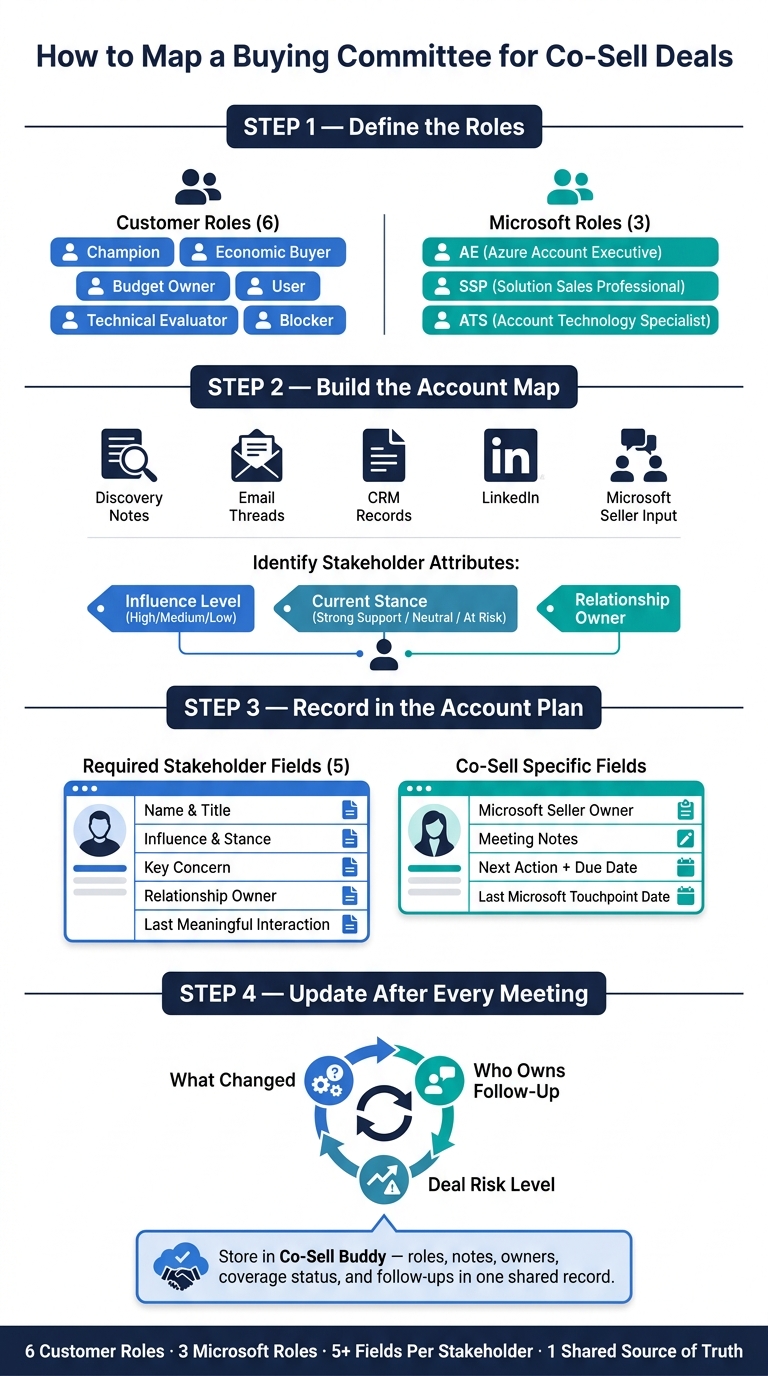
Use six customer-side roles: champion, economic buyer, budget owner, user, technical evaluator, and blocker. Give each contact one role, then keep that label the same across the account plan.
- Champion: internal advocate who builds support for the solution
- Economic buyer: final approver
- Budget owner: controls funding
- Users: daily operators of the solution
- Technical evaluator: checks fit, security, and risk
- Blocker: can delay or stop the deal
These labels are the base for naming each stakeholder in the deal map. After that, map the Microsoft people who influence those roles.
Microsoft roles to include in the map
Add the Microsoft field contacts that shape the deal: AEs, SSPs, and ATSs. The three roles that matter most are azure account executives (AEs), who manage the overall relationship and can source qualified pipeline; Solution Sales Professionals (SSPs), who focus on specific solution areas; and Account Technology Specialists (ATSs), who provide deep technical guidance and influence the technical evaluator’s perspective.
Map Microsoft contacts as influencers. They affect intro access, technical validation, and seller alignment.
| Microsoft Role | Co-Sell Role | Typical Influence |
|---|---|---|
| Azure account executive (AE) | Owns Microsoft account motion and sources pipeline | Economic buyer, budget owner |
| Solution Sales Professional (SSP) | Specialist for specific solution areas | Technical evaluators, users |
| Account Technology Specialist (ATS) | Technical lead and risk assessment | Technical evaluators, blockers |
Once the roles are set, map real names to each one in the account plan.
Step 2: Build the account map from real deal signals
Once the roles are clear, the next move is simple: put real names against each role using live deal evidence.
Where to find names and reporting lines
Start with the sources closest to the deal itself: discovery notes, email threads, calendar invites, CRM records, and prior account notes. That’s usually where the first set of names shows up.
Then use LinkedIn and public company sources to check titles, business units, and reporting lines. A title can point you in the right direction, but it doesn’t always tell you who someone reports to. Don’t guess.
You should also ask the Microsoft AE, SSP, or ATS which contacts they’ve already met and who they know inside the account. In a co-sell motion, this input is key because it helps close gaps in coverage across the account map.
Add influence, stance, and relationship owner
For each stakeholder, add three fields so the account map stays useful during an active deal: influence level (High, Medium, or Low), current stance (Strong Support, Neutral, or At Risk), and relationship owner - the person responsible for that connection.
This turns the account map into something the team can act on. High-influence contacts who are at risk should move to the top of the list before the next meeting. It also shows where the Microsoft seller connects into the customer committee, which helps avoid duplicate outreach and blind spots.
| Attribute | Options | Why It Matters |
|---|---|---|
| Influence Level | High / Medium / Low | Prioritizes who needs the most attention |
| Current Stance | Strong Support / Neutral / At Risk | Flags where the deal is vulnerable |
| Relationship Owner | Internal team member or Microsoft seller | Prevents duplicate outreach and coverage gaps |
Next, record these names and attributes in the account plan so the team works from one source of truth.
Step 3: Record the committee in your account plan
Put the buying committee into one shared account plan so the whole team works from the same live picture. Once the names are there, fill in the fields that show who owns each relationship and what needs to happen next.
Required fields for each stakeholder
For each person on the buying committee, record their name, title, and role label. Stick with the same labels from Step 1: Champion, Economic Buyer, Budget Owner, User, Technical Evaluator, and Blocker.
Then carry over influence, stance, and relationship owner from Step 2. Add their key concern and the last meaningful interaction too. That keeps the record current instead of letting details get buried in scattered notes.
For example, if a contact joined the customer call on 09/13/2026 and asked about security review timelines, that detail belongs in the record, not in someone’s inbox.
| Field | What to Record |
|---|---|
| Name, Title, Role Label | Who they are and their formal role in the deal |
| Influence & Stance | How much weight they carry and where they stand |
| Key Concern | What they raised - budget timing, security review, deployment ownership |
| Relationship Owner | Who on your team or Microsoft’s team owns this contact |
| Last Meaningful Interaction | Date and context of the most recent substantive exchange |
Co-sell fields that prevent execution gaps
Standard CRM fields cover the customer side. Co-sell deals need one more layer.
Add these fields:
- Microsoft seller owner - the specific AE, SSP, or ATS tied to the account
- meeting notes
- next action with a due date
- date of last Microsoft touchpoint
These fields keep customer decision-making separate from Microsoft seller activity. Without them, teams often assume Microsoft is handling a contact when no one has checked.
If the Microsoft touchpoint date is stale, that’s your cue to re-engage the Microsoft seller before the next customer meeting. Store the committee in Co-Sell Buddy so roles, notes, owners, and follow-ups stay tied to the account.
Use meeting notes to update the record after every call.
Step 4: Update the map after every meeting and store it in Co-Sell Buddy
Once the committee is in the account plan, keep it up to date after every meeting. Treat each meeting like a checkpoint. If a buyer changes position, a new blocker shows up, or a budget owner enters the picture, the map should show it right away.
Use meeting notes as the update trigger
Right after a meaningful customer or Microsoft interaction, open the account record and update three things: what changed, who owns the follow-up, and whether deal risk increased or decreased.
Use the meeting notes to log any shift in names, stance, risk, or next step. If someone agreed to do something on the call, add that commitment to the record with the person’s name and a due date. Simple, clear, and easy for the team to track.
Store committee data in Co-Sell Buddy
Co-Sell Buddy stores those updates in one place. Co-Sell Buddy holds role labels, contact relationships, meeting notes, seller ownership, coverage status, and follow-up tasks in one shared record [1]. That means the whole deal lives in a single record instead of being scattered across emails and side notes.
The account heatmap inside Co-Sell Buddy shows where the team has relationship strength and where gaps still exist [1]. When a new name comes up or a contact’s stance changes, update the record immediately. That way, everyone stays aligned on the current deal state.
Conclusion: A simple system for committee mapping
Once the committee is in Co-Sell Buddy, the final step is keeping it up to date.
A buying committee map only helps if it reflects what’s happening now. That means you need to define roles, map actual names, record ownership, and update the map after every meeting. That’s the difference between a working record the team can use and a slide that goes stale.
Co-Sell Buddy helps keep that map current and makes weak spots easy to see. Its heatmap shows coverage gaps at a glance, so the team knows where to focus next.
FAQs
How do I handle one contact with multiple roles?
If one contact fills multiple roles in the buying committee, prioritize the role where they have the most influence in your account plan. That keeps your outreach focused and avoids muddying the picture.
In Co-Sell Buddy, use meeting notes or account plan fields to record their full scope of influence. This helps keep coverage mapping clear while still showing how they affect the deal from more than one angle, like budget approval and technical adoption.
What should I do if I cannot identify the economic buyer yet?
Use your account heatmap and Co-Sell Buddy context to spot gaps in coverage and relationship depth.
Then team up with known contacts or Microsoft sellers to figure out who controls the budget and who has the most influence. As you map the rest of the committee, keep documenting account activity and relationship status so the picture gets clearer over time.
How often should I update the buying committee map?
Update your buying committee map during your weekly pipeline review. When you keep it in Co-Sell Buddy next to your account plan, it’s much easier to keep the information current and ready to use.
Tie those updates to your normal operating rhythm, like weekly pipeline calls or partner manager check-ins. That way, the committee stays aligned with recent account movement and Microsoft co-sell activity.