
· 8 min read
How Partner Capability Messages Support Co-Sell Deals
Craft a six-line partner capability message to show Azure fit, evidence, scope, seller value, and next steps for co-sell deals.
In this article
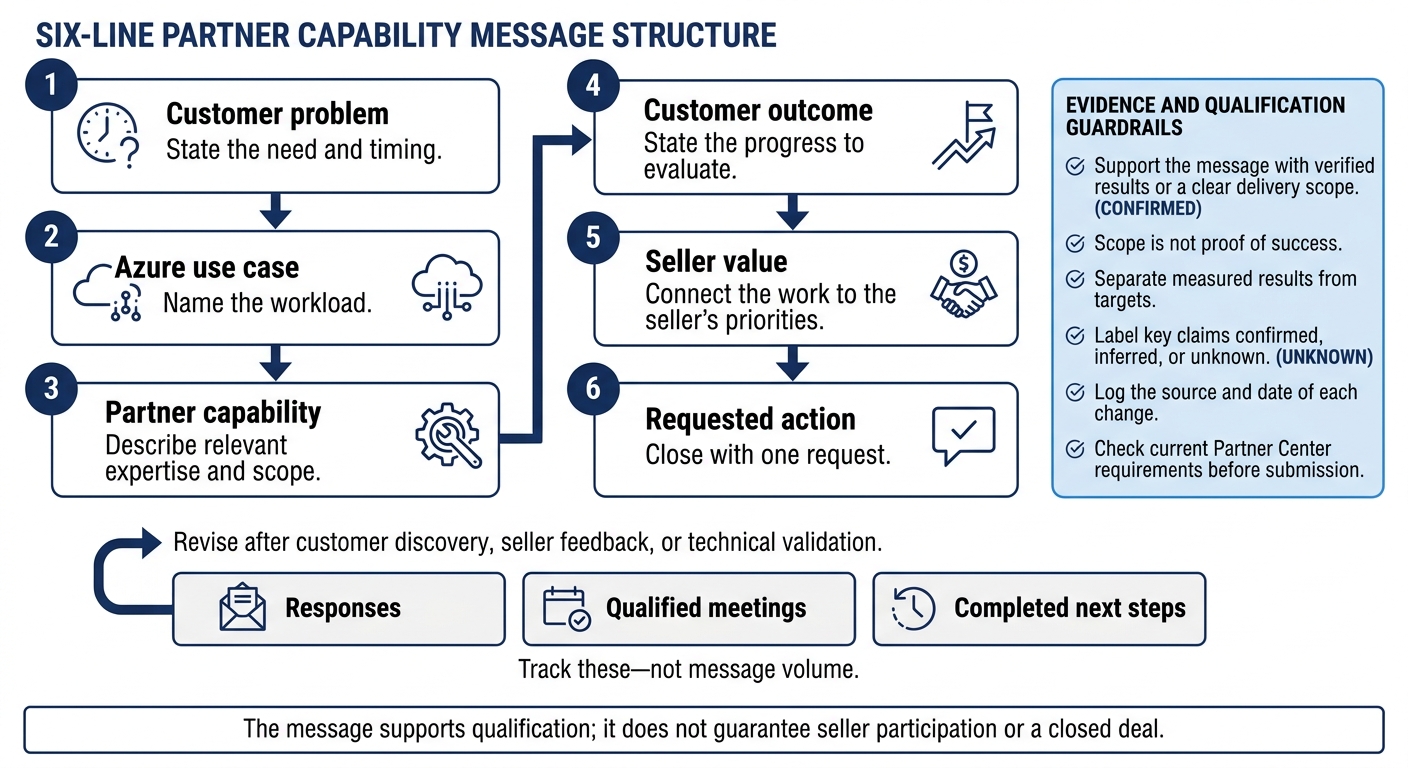
A partner capability message helps a Microsoft seller judge whether a partner fits a customer’s need. Start with 6 short lines: the customer’s problem, Azure use case, partner skills, intended outcome, seller value, and one requested action.
Support the message with verified results or a clear delivery scope. Keep targets separate from measured outcomes, flag unknowns, and check current Partner Center requirements before submission.
Then update the message as discovery adds facts. Track replies, qualified meetings, and completed next steps - not message volume. The message supports qualification; it does not guarantee seller participation or a closed deal.
Referrals: Creating a Co-sell Deal
Link Technical Skills to Customer Outcomes
Use the one-sentence capability statement from the prior section to build this mapping.
Match the Customer Problem to an Azure Use Case
Choose one delivery strength, such as source-system integration. Connect it to the customer’s day-to-day problem, affected stakeholder, and business consequence before naming the Azure use case. Include technical details only when they help explain customer fit or delivery boundaries.
Hypothetical regional distributor: Inventory reports arrive several days after warehouse activity because ERP, warehouse, and spreadsheet data are consolidated manually. One design uses Azure Data Factory to ingest and transform data, Azure storage to organize it, and Power BI for inventory views. Operations and purchasing leaders lack timely information for replenishment decisions, creating stockout and excess-inventory risk. More frequent reporting and faster purchasing decisions are targets to validate - not achieved results. Qualification depends on confirming reporting cadence, data ownership, and pilot scope.
Identify the skills this work requires: source-system integration, data modeling, dashboard design, identity and access controls, testing, and support. Then define the team’s role: assess sources, build a pilot data flow, or support production. Reporting cadence and data ownership tell you more about customer fit than a long list of services.
Document Evidence and Qualification Signals
Record the facts a seller needs in a shared worksheet, and clearly label unconfirmed customer assumptions. Keeping the seller’s view in one place helps keep account discussions short and factual.
| Field | What to record |
|---|---|
| Customer problem | Current reporting delay, manual work, and business consequence |
| Stakeholder | Problem owner, affected users, and potential executive sponsor |
| Microsoft solution area / sales play | Current Partner Center classification that fits the opportunity |
| Azure use case | Proposed integration, storage, and reporting scenario |
| Partner capability | Relevant delivery skills and verified experience |
| Intended business outcome | Baseline, target improvement, and measurement method |
| Supporting evidence | Documented results, authorized references, credentials, or delivery artifacts |
| Delivery scope | Included sources, pilot boundaries, security responsibilities, and support commitments |
| Qualification signal | Confirmed initiative, budget, decision date, sponsor, or technical fit |
| Next step | Specific action, named owner, and due date |
Scope is not proof of success. A pilot plan describes intended work. Verified delivery records show experience. A measured outcome needs a documented baseline and measurement method.
Before submission, check Microsoft’s current solution-area and sales-play terms and the Partner Center requirements for your co-sell path. Check the profile, Marketplace status, regional contacts, and required solution materials.
Write for the Seller’s Account Discussion
Explain Why This Customer, Now, and This Partner
Turn the facts you gathered into an account note the seller can use. Start with one confirmed account fact - not company history.
Explain why this customer, why now, and why this partner using a stakeholder-confirmed need, a verified timing trigger, and proof of relevant delivery work. If timing isn’t confirmed, make it a discovery question. Don’t use it to claim urgency.
Be clear about who does what. The seller can confirm account fit or make an introduction. Your team owns the assessment and technical work.
Keep the note short enough for a seller to scan in seconds.
Use a 6-Line Message
Give each line one job:
- Customer problem: State the need and timing.
- Azure use case: Name the workload.
- Partner capability: Describe relevant expertise and scope.
- Customer outcome: State the progress to evaluate.
- Seller value: Connect the work to the seller’s priorities.
- Requested action: Close with one request.
Expand the note into a discovery brief only after the seller confirms account relevance.
The example below shows how to structure a seller note. It doesn’t describe a real account.
Example: A Hypothetical Inventory Project
Customer problem: The distributor’s delayed inventory reporting may be slowing purchasing decisions.
Azure use case: Azure data integration and analytics could connect source systems and make inventory information available sooner.
Partner capability: We can run a bounded assessment of the reporting flow, data sources, and integration constraints.
Customer outcome: The goal is more timely information for purchasing decisions; no performance result is assumed before discovery.
Seller value: This could represent a potential Azure workload tied to the scenario’s reporting need, subject to qualification.
Requested action: Could you introduce us to the owner of inventory reporting for a 30-minute discovery discussion?
Use and Update the Message During Co-Sell
Choose the Right Message Length
Start with the six-line message, then adjust its length to match the stage. For account planning, add stakeholder context and a reason to engage. For qualification, flag gaps in budget, timing, decision authority, and technical constraints. For deal collaboration, add scope, blockers, and the Microsoft support needed. Update only what changed and the next step.
| Message format | Best use | Required content | Common failure |
|---|---|---|---|
| One sentence | Introductions and account-team handoffs | Customer problem, partner fit, intended outcome | Vague taglines |
| Short paragraph | Email or Teams | Core message, account context, evidence, seller value, one request | Competing requests |
| One page | Solution summaries and deal preparation | Account context, evidence, Azure mapping, scope, qualification gaps, stakeholders, owners, next steps | Long lists of unrelated services |
Revise the message after customer discovery, seller feedback, or technical validation. Label key claims confirmed, inferred, or unknown, and log the source and date of each change. If funding isn’t confirmed, keep it visible as a qualification gap - not a settled fact.
Assign Ownership and Track Follow-Up
Once the seller engages, track message changes in the opportunity’s sales workflow. Include the account, seller contact, message version, requested action, owner, and follow-up date. Also record the date sent, response status, stage, and next step.
Track responses, qualified meetings, and completed next steps - not message volume.
Conclusion: Check Before Sending
Review the message in this order: customer problem → Azure use case → partner capability → customer outcome → seller relevance → next step. If a link is missing, rewrite it. Make sure a seller can easily repeat the message in an account discussion.
Be explicit about the need, Azure fit, evidence, scope, measurable outcome, seller value, and next step. Don’t leave the seller to connect the dots.
Cut unsupported claims, unexplained acronyms, and broad capability lists. Separate measured results from targets. If any partner could send the same message unchanged, spell out the proof or delivery scope that sets you apart.
Before sending, use this check to tighten your draft. Write one six-line message for one live account now. Ask the Microsoft seller to challenge the customer problem, Azure fit, and proposed action. Then use that feedback to make the message easier to repeat - and act on.
FAQs
How can I show credibility without customer case studies?
Build trust with proof, not sales language. Share deployment timelines, cost savings, time-to-value estimates, or efficiency gains.
Put that proof in a one-pager or brief success summary from a pilot project or engagement. Separate measured results from estimates. If you don’t have results yet, establish a baseline and lay out what you’ll measure at 30, 60, and 90 days. Tie each metric to the customer outcomes in your positioning statement.
How do I tailor seller value to each account?
Tailor your message to each Microsoft role’s quota and current priorities: account executives need a clear link to business priorities and the path to closing a deal; solution specialists need technical fit and dependencies; customer success managers need adoption and value realization.
Confirm each person’s goals - don’t assume everyone shares the same incentives. Use account heatmaps to track relationship strength and coverage. For active pursuits, focus on urgency and blockers. For expansion opportunities, show how adjacent workloads support business outcomes.
When should I follow up with an unresponsive seller?
Mark the engagement as at risk or inactive based on how long the seller has been silent. Skip vague check-ins. Define the next step, set a deadline to get things back on track, and ask for one simple action, such as a 20-minute call.
If communication stays stalled, document your outreach outside the portal. Consider bringing in your alliance leader to help restore contact or resolve ownership conflicts.