
· 9 min read
Microsoft Co-Sell Readiness: Requirements Checklist
Verify Partner Center records, live Marketplace offer, regional sales contacts, co-sell documents, Azure IP eligibility, and outreach readiness.
In this article
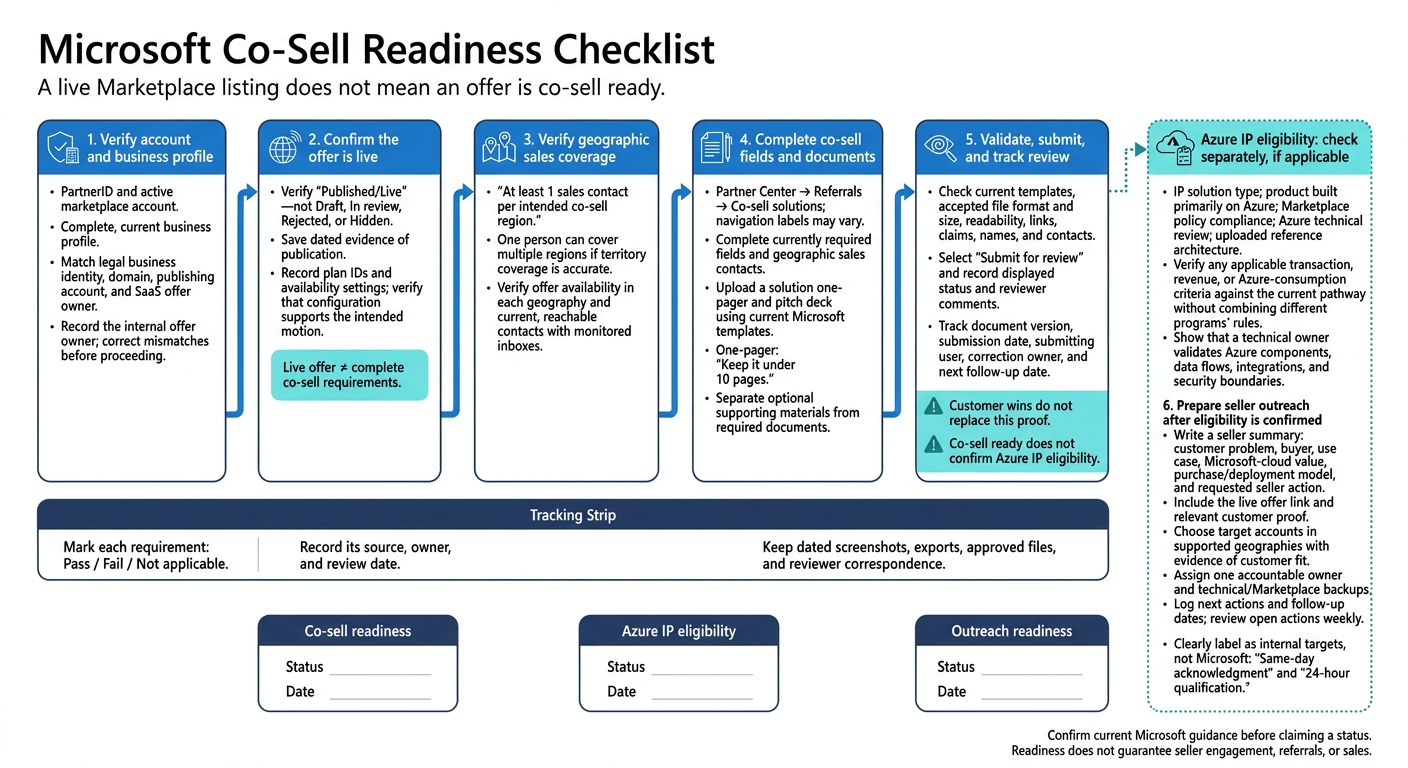
A live Marketplace listing does not mean an offer is co-sell ready. Partners must also verify their Partner Center account and business profile, assign at least 1 sales contact per intended region, and complete the required co-sell fields and documents.
This checklist covers:
- Account and offer checks: PartnerID, active marketplace account, current business profile, and live SaaS offer.
- Contacts and documents: Geographic sales coverage, monitored inboxes, a solution one-pager, and a pitch deck.
- Separate status checks: Co-sell review status and Azure IP eligibility, including applicable technical and commercial requirements.
- Seller outreach: A short seller summary, target accounts, named owners, and follow-up dates.
Mark each requirement Pass, Fail, or Not applicable, and record its source, owner, and review date. Confirm current Microsoft guidance before claiming a status. Readiness does not guarantee seller engagement, referrals, or sales.
Check Publication, Partner Profile, and Sales Contacts
Verify the Partner Account and Business Profile
Start with the Partner Center records Microsoft uses to check co-sell readiness: partner identity, marketplace account, and business profile. Record the PartnerID, active marketplace account, and internal offer owner.
Check that the legal business identity, domain, publishing account, and SaaS offer owner match. Mark any mismatch not ready until it’s corrected.
| Requirement | Where to verify it | Evidence of completion | Status |
|---|---|---|---|
| Formal prerequisite - PartnerID and active marketplace account | Partner Center account and organization details | PartnerID and active publishing-account record for the intended organization | Pass / Fail |
| Formal prerequisite - Complete business profile | Partner Center → Referrals → Business profile | Current expertise, capabilities, locations, selling markets, and referral contacts; internal owner and review date. Check accuracy against the Marketplace listing.[6][8][10] | Pass / Fail |
| Conditional requirement - Intended co-sell motion | Offer configuration and Co-sell workspace | Offer type, plan configuration, availability, and selected markets support the intended motion | Pass / Fail / Not applicable |
Confirm the SaaS Offer Is Live
In Partner Center → Marketplace offers, check that the offer status is Published/Live - not Draft, In review, Rejected, or Hidden. Save a dated export or live listing as proof.[7][9]
Record the plan IDs and availability settings for every plan tied to the intended motion.
| Offer condition | Formal prerequisite or quality check | Evidence | Status |
|---|---|---|---|
| Offer is published and live | Formal prerequisite | Live status, offer ID, publisher, and publication date | Pass / Fail |
| Offer is draft, preview-only, or unpublished | Formal prerequisite not met | Partner Center status | Fail |
| Public/private plan configuration supports the intended motion | Conditional requirement | Plan IDs, market settings, and applicable rule verified | Pass / Fail / Not applicable |
| Descriptions, pricing, screenshots, and buyer instructions are accurate | Listing-quality check | Dated listing review | Pass / Fail |
| Offer is live, but required co-sell fields are incomplete | Separate co-sell requirement not met | Co-sell > Solutions record and required collateral | Fail |
Once you’ve checked the offer and profile, verify sales coverage for each geography.
Check Sales Contacts by Geography
Microsoft requires at least one sales contact per intended co-sell region. One person can cover multiple regions, provided the assigned territory is accurate.[7]
| Geography | Offer availability | Assigned sales contact | Verification evidence | Status |
|---|---|---|---|---|
| Each requested geography | Verify the offer is available | Name, business email, phone, role, territory, and backup | Microsoft contact template and Co-sell > Solutions record; referral authorization, monitored inbox, contact export, and verification date | Pass / Fail |
| Each geography assigned to a multi-region contact | Verify availability separately | Confirm the contact covers this territory | Dated coverage confirmation | Pass / Fail |
| Each geography with a stale or unreachable contact | Verify continued availability | Replace with a reachable contact who has permission to handle referrals | Contact export and successful retest date | Fail until verified |
Complete Co-Sell Fields and Documents
After checking the profile and contacts, complete the Co-sell record and supporting files. Go to Partner Center → Referrals → Co-sell solutions and select the relevant Marketplace offer or solution. Enter the co-sell details, upload documents, and check status there. Navigation labels can vary, so look for Co-sell, Co-sell solutions, or Solutions.[8][13]
Complete Required Fields, One-Pager, and Pitch Deck
Fill in the fields Microsoft currently requires for your offer and status. Review the solution description, solution areas, sales plays, industry or customer relevance, and geographic sales contacts. Keep optional fields separate from required fields, and check that each classification matches what the offer can do.[5][8]
Use Microsoft’s current customer-ready templates for the solution one-pager and pitch deck, then upload the completed files. The one-pager should explain the customer problem, target audience, SaaS solution, Microsoft-cloud relationship, key capabilities, business outcomes, and next step. Keep it under 10 pages.[5]
The pitch deck should help sell the solution and match the one-pager and Marketplace listing. Case studies, demo links, ROI calculators, and a channel pitch deck are supporting materials - not requirements unless Microsoft’s current instructions say otherwise.[5]
If Azure IP status matters for this offer, check that pathway separately before submitting.
Check Azure IP Co-Sell Eligibility Separately
Review the current Microsoft Learn requirements for the applicable Azure IP pathway. Check for an IP solution type, a product built primarily on Azure, Marketplace policy compliance, an Azure technical review, and an uploaded reference architecture.[6][12][14]
Verify any transaction, revenue, or Azure-consumption criteria separately. Don’t combine requirements from different programs. Have a technical owner check that the architecture diagram accurately shows Azure components, data flows, integrations, and security boundaries. Customer wins do not replace this proof.[6][12][14]
Validate Documents and Track Review Status
Before selecting Submit for review, check that you’re using the current template and accepted file format and size. Confirm that formatting is readable, links work, product and offer names are current, contacts are correct, and customers can verify your claims.[5]
After uploading the files, check their status and address review comments promptly. Log the document version, submission date, submitting user, displayed status, reviewer comments, correction owner, and next follow-up date.
“Under review” is not approval, and “Co-sell ready” does not confirm Azure IP eligibility.[11][13][14]
Prepare for Microsoft Seller Outreach
Once eligibility is confirmed, prepare the record for seller outreach. Co-sell readiness makes your offer visible to Microsoft sellers. Outreach turns that visibility into a request tied to a specific account.[15][16]
| Area | Seller-outreach preparation |
|---|---|
| Marketplace publication | Share the live offer link and preferred purchase and deployment path. |
| Business profile | Outline industry fit, Microsoft-cloud workloads, customer proof points, and geographic coverage. |
| Sales contacts | Match each target account and territory with the right internal and Microsoft contacts. |
| Documents | Tailor materials so sellers can use them easily in account discussions. |
| Positioning and targeting | Explain why the offer matters to Microsoft and the customer. Then choose accounts, industries, territories, and solution plays backed by evidence of customer fit. |
| Ownership and follow-up | Assign an owner, log responses and referrals, and set dates for next steps. |
Use the two steps below to prepare the offer for a seller conversation.
Write a Seller Summary and Choose Target Accounts
Write a short summary for sellers covering the customer problem, buyer, industry, use case, Microsoft-cloud value, deployment and purchase model, and what you’re asking the seller to do. Include the live offer link and relevant customer proof. For an active opportunity, add its stage, value, and close date.
Choose accounts in supported geographies where you have evidence of customer need, relevant Microsoft workloads, and an identifiable buying initiative. Link each account to one customer outcome, the Marketplace offer, relevant materials, and one requested action.
Assign an Outreach Owner and Set Follow-Up Dates
Name one accountable owner and backups for technical and Marketplace questions. Track the account, seller contact, initial outreach date, opportunity stage, response or referral status, next action, and follow-up date.
Review open actions weekly. Use same-day acknowledgment and 24-hour qualification as internal targets.[4]
Conclusion: Review Your Readiness
Confirm Formal Requirements and Approval Status
Check your status in Partner Center to verify readiness.
- [ ] Verify your PartnerID, Marketplace account, and business profile.
- [ ] Confirm your SaaS offer is live and geographic sales contacts are current.
- [ ] Submit required co-sell documents, and record the review status and any open issues.[6][18]
- [ ] Check Azure IP co-sell eligibility separately, reviewing the SaaS reference architecture and any applicable supporting evidence.[6][17]
Keep dated screenshots, exports, approved files, and reviewer correspondence in a controlled folder.
Confirm Outreach Materials and Ownership
Once you’ve recorded formal status, prepare for outreach.
- [ ] Approve the seller summary and update outreach materials, with key proof points and references available.
- [ ] Prioritize target accounts and identify relevant solution areas.
- [ ] Assign a primary owner and backup.
- [ ] Log follow-up dates, open questions, and next actions.
After logging both checks, track co-sell readiness, Azure IP eligibility, and outreach readiness separately.
FAQs
Which offer changes require a new co-sell review?
Start a new co-sell review when major changes affect how your offer aligns with Microsoft priorities or meets eligibility requirements. Update your positioning statement and request a review when solution plays, eligibility rules, or the offer’s core scope change [1][2].
Also update seller-readiness materials when customer success summaries, your core deployment approach, or funding program applications such as ECIF or MACC change. These materials should reflect your current offer [3][2].
How often should I recheck co-sell readiness?
Review your co-sell readiness every 90 days to keep assets, references, and program details current. Update them right away after a major change, such as a new customer win, a change to your core offer, or updates to Microsoft programs like ECIF or MACC.
These reviews keep your supporting proof and documentation in line with Microsoft’s current approach, helping prevent outdated information from slowing seller engagement.
What should I do if Microsoft sellers don’t respond?
Treat the engagement as at risk or inactive, based on how long sellers have been silent. Make sure your outreach asks for a clear, simple action - such as a 20-minute call - instead of a vague follow-up.
If communication stays stalled, reset the next action and set a recovery deadline. Follow up directly and document your outreach; don’t rely on portal submissions alone. If needed, bring in your alliance leader to restore contact or resolve ownership conflicts.